⚡ Apps

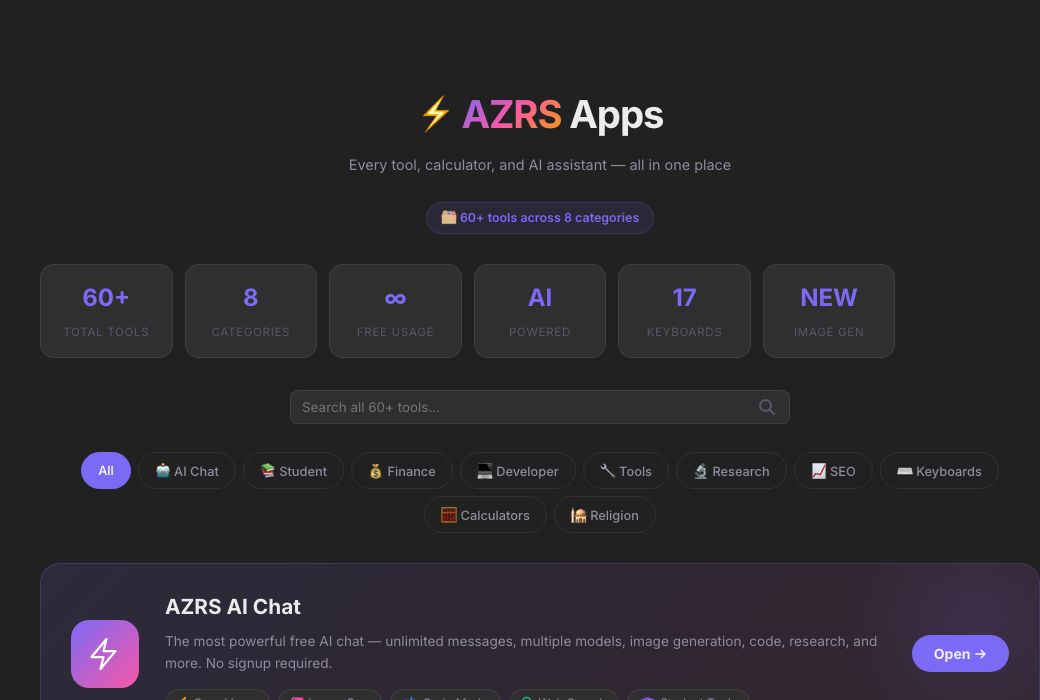
⚡ AZRS Apps

Every tool, calculator, and AI assistant — all in one place

🗂️ 60+ tools across 8 categories
60+Total Tools
8Categories
∞Free Usage
AIPowered
17Keyboards
NEWImage Gen

🎨 AI Image Generator

Type a prompt below — AZRS AI will create your image instantly
🌌 Nebula dreamscape, cosmic purples
Click to expand
🤖 Futuristic robot portrait
Click to expand
🏙️ Neon cyberpunk city
Click to expand
🌿 Fantasy enchanted forest
Click to expand
🌊 Ocean sunset, oil painting
Click to expand
AI generated image
Preview

See AI Apps — Every Tool on AZRS in One Directory in action

azrscorp.com/ai/apps/
Screenshot of the free AI Apps — Every Tool on AZRS in One Directory tool on AZRS QuickFix
1Open AI Apps from the sidebar or main nav.
2Type a keyword in the search box, or pick a category filter.
3Click any tool card to open it directly.
Overview

AI Apps — Every Tool on AZRS in One Directory

AI Apps is a searchable, filterable directory of every tool across the whole site — 60+ tools spanning AI chat, student tools, finance calculators, developer utilities, general tools, research, SEO tools, keyboard/typing tools, calculators and religion tools — with a live search box and category filters so you can find anything fast.

It's the fastest way to discover a tool you didn't know existed, rather than relying only on the main navigation menu.

Highlights

Key features

Live search

Type any keyword and the grid filters to matching tools instantly.

Category filters

Jump straight to AI, Student, Finance, Developer, Tools, Research, SEO, Keyboard, Calculator or Religion tools.

Featured AI Chat banner

Quick access to the flagship AI Chat with its key features highlighted.

AI Image Gallery

A live mosaic preview of the AI image generator built right into the directory.

Walkthrough

How to use it

  1. Open AI Apps from the sidebar or main nav.
  2. Type a keyword in the search box, or pick a category filter.
  3. Click any tool card to open it directly.
Audience

Who uses this tool

New visitors

The fastest way to see everything the site offers at a glance.

Returning users

Quickly re-find a specific tool without remembering its exact URL.

Anyone browsing by category

Filter down to just Finance, or just Developer tools, for example.

FAQ

Frequently asked questions

How many tools are listed?

60+ tools across 8 categories, spanning AI, student, finance, developer, general, research, SEO, keyboard, calculator and religion tools.

Do I need an account to use the listed tools?

Most tools work without logging in; a few (like Saved Chats) require a free account.

Is the search live?

Yes, results filter as you type, no page reload needed.

Can I open a specific tool directly by URL?

Yes, each app has its own direct URL (e.g. /ai/apps/image-gen/) for bookmarking or sharing.

Is everything here free?

Yes, every tool listed is free to use.

⚙️ Settings
General
Response language
AI replies in this language
Enter to send
Shift+Enter for new line
Auto web search
Search web for recent questions
Show timestamps
Time on each message
Auto-scroll to bottom
While AI is responding
Show source links
Display web search sources
AI & Models
PreciseCreative
This is added before every conversation to customize AI behavior.
Chat
Auto-generate chat titles
AI names chats by topic
Save chats locally
Keep history on this device
Show thinking dots
Animation while AI responds
Code syntax highlighting
Colorize code blocks
Auto-open canvas for code
Open side panel on code reply
Show provider badge
Which AI answered
Message sound
Play sound on new message
Appearance
Theme
Accent color
Font size
Message width
Compact messages
Less padding between messages
Animated backgrounds
Subtle motion effects
Voice & Speech
Auto-send after voice
Send immediately after mic stops
AI reads responses aloud
Text-to-speech for AI answers
Keyboard Shortcuts
New chatCtrl+N
Focus inputCtrl+/
Toggle sidebarCtrl+B
Open settingsCtrl+,
Send messageEnter
New lineShift+Enter
Stop generationEscape
Toggle dark/lightCtrl+D
Privacy & Data
Save chat history
Store messages on this device
Share usage for improvement
Anonymous analytics only
Link preview in messages
Generate previews for URLs
Remember model choice
Persist selected model
Notifications
Desktop notifications
When AI finishes responding
Sound on response
Subtle chime
Error alerts
Show pop-up on errors
Advanced
Debug mode
Show AI provider in responses
Markdown rendering
Format bold, code, lists etc.
LaTeX math rendering
Render math equations
Link detection
Auto-link URLs in messages
Check API keys status
Account
👤
Sign in to AZRS AI
Save chats to your account, sync across devices, and access your history anywhere.
Log in Create account