
Explore the DC Motor Simulator: Torque, Speed & Back-EMF
Spin a permanent-magnet DC motor against a load, watch it settle onto its torque-speed curve, and see it stall if the load is too heavy.
- Free to use
- No signup
- Nothing to install
- Runs in your browser
Illustration. Open the tool for the real thing.
See it in action
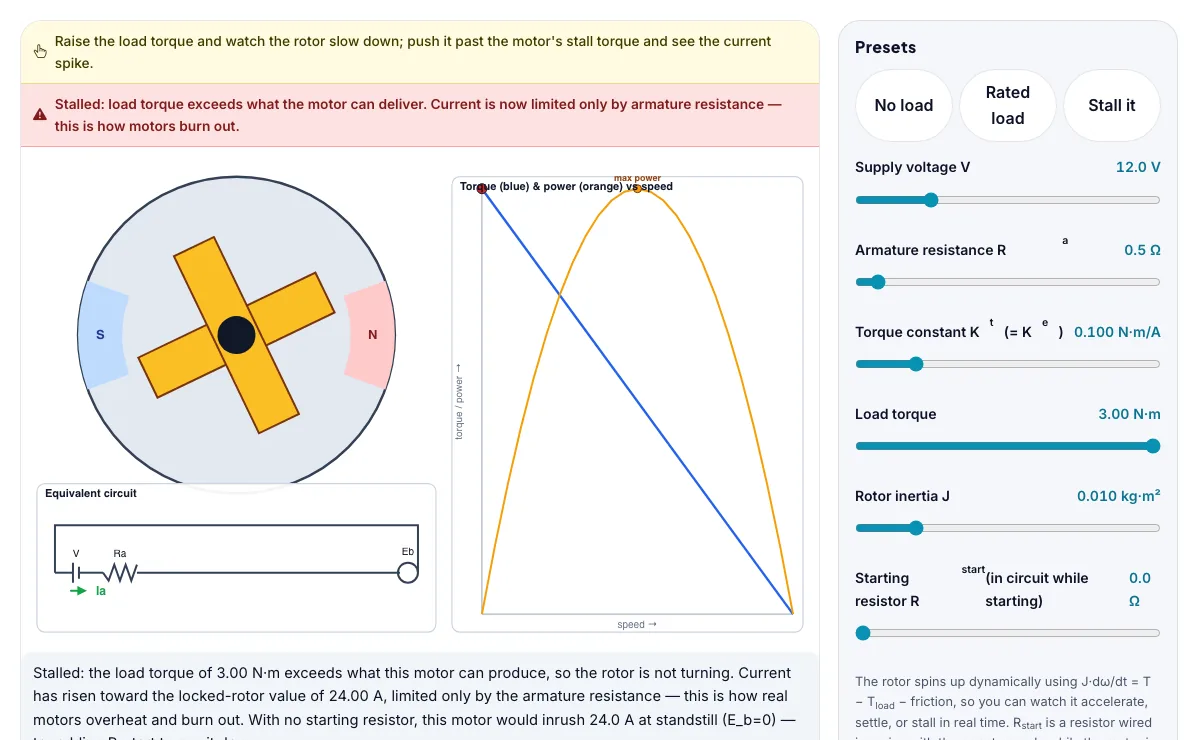
The DC Motor Simulator: Torque, Speed & Back-EMF with sample data entered and the result showing.
What is the DC Motor Simulator: Torque, Speed & Back-EMF?
Spin a permanent-magnet DC motor against a load, watch it settle onto its torque-speed curve, and see it stall if the load is too heavy. It runs in your browser, so a change to a setting or a drag on an object shows up at once.
Permanent-magnet DC motors like this one drive cordless power tools, small robots, electric window and seat motors in cars, toy and hobby motors, and the fans and pumps in countless appliances.
3 steps to your result
Open the tool and follow along. Nothing to install.
What you get
Back-EMF Eb = Ke×ω grows as the rotor speeds up, and it opposes the supply voltage.
Armature current Ia = (V − Eb) / Ra, so current is highest the instant the motor starts (Eb = 0) and falls as it speeds up.
Developed torque T = Kt×Ia, and Kt and Ke are the same constant in SI units.
Set the load torque to zero and see how close the rotor gets to the theoretical no-load speed V/Ke.
Slowly raise the load torque and watch the operating point slide down the torque-speed line while current climbs.
Use the Stall it preset and read the current warning — compare it with the running current at rated load.
Used for
Pick one to see how it fits.
Engineering learners
Engineering and technology students, makers, robotics clubs and teachers of design and technology.
Try it freeTeachers
For teachers: project the DC Motor Simulator: Torque, Speed & Back-EMF on the board, let students predict the result, then run it together and test this: Slowly raise the load torque and watch the operating point slide down the torque-speed line while current climbs. For students: change one thing at a time and write down what changes.
Try it freeHow it compares
A plain look at this tool next to the usual alternative.
| This simulation | Textbook diagram | |
|---|---|---|
| Interactive | Drag, tap and change settings | Fixed picture |
| Install | Nothing to install | Not needed |
| Cost | Free to use | Depends on the book |
Questions people ask
Why does current spike when a motor first starts or stalls?
At zero speed there is no back-EMF to oppose the supply, so the only thing limiting current is the armature resistance, which is usually small — that is why starting and stall currents can be many times the running current.
What is the difference between Kt and Ke?
They describe the same physical constant of the motor. Ke relates speed to back-EMF (volts per rad/s) and Kt relates current to torque (newton-metres per amp); in consistent SI units they have the same numeric value.
Why is the torque-speed curve a straight line?
Because Ia = (V − Keω)/Ra is linear in ω, and T = Kt×Ia, so T is a linear (decreasing) function of speed — maximum torque at standstill, zero torque at the free-running speed.
Is the DC Motor Simulator: Torque, Speed & Back-EMF free to use?
Yes. The DC Motor Simulator: Torque, Speed & Back-EMF is free, needs no signup or download and runs in your web browser. It is part of the Engineering group of AZRS simulations.
Does the DC Motor Simulator: Torque, Speed & Back-EMF work on a phone or tablet?
Yes. The DC Motor Simulator: Torque, Speed & Back-EMF takes touch input as well as mouse input, so you can use its 5 adjustable settings with a finger. A larger screen makes the controls and graphs easier to read.
More free tools
Related to the DC Motor Simulator: Torque, Speed & Back-EMF.
Try the DC Motor Simulator: Torque, Speed & Back-EMF now
Spin a permanent-magnet DC motor against a load, watch it settle onto its torque-speed. Free to use.
Try it free