WebRTC Leak Test (VPN IP Check)
Check whether your browser leaks your real IP address through WebRTC · free, no signup
| Type | Address | Protocol | What it means |
|---|---|---|---|
| Gathering… | |||
.local names. If nothing is found, WebRTC is blocked or your network blocks the STUN test server.See WebRTC Leak Test (VPN IP Check) in action
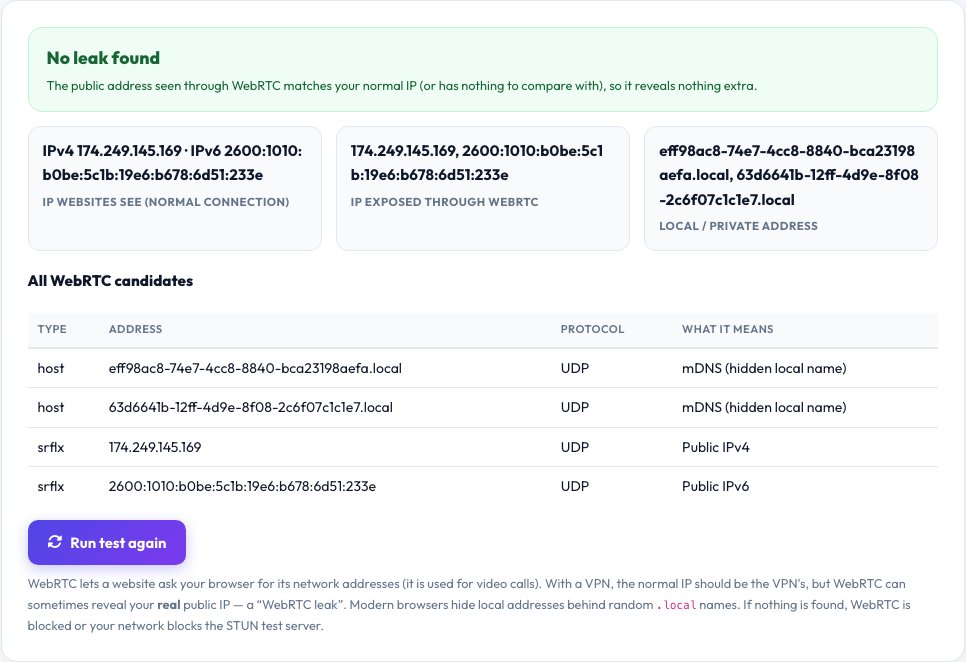
WebRTC Leak Test — Is Your VPN Really Hiding Your IP?
WebRTC is the browser technology behind video calls. To connect you directly to other people it can ask your browser for its network addresses — and websites can ask too. If you use a VPN, WebRTC can sometimes reveal your real public IP address even though normal web traffic goes through the VPN. This is called a WebRTC leak.
This test contacts public STUN servers, collects every address your browser exposes, and compares them with the IP address websites normally see. Matching addresses mean no leak; a different public address means a possible leak. Local addresses are shown too, although modern browsers hide them behind random .local names. Results appear in about six seconds and everything is done in your browser.
Key features
Compares two IPs
The IP websites see versus the IP WebRTC exposes.
Candidate table
Every address type: host, server-reflexive and relay.
Clear verdict
Leak, no leak, or WebRTC blocked.
Private
Only public STUN servers are contacted.
How to use it
- Connect your VPN (if you use one).
- Open this page and wait about six seconds.
- Compare the “IP websites see” and “IP exposed through WebRTC”.
- If they differ, disable WebRTC or use a VPN with leak protection.
Worked example
Example
Web IP 185.x.x.x (VPN) · WebRTC public IP 82.x.x.x (home) → possible leak: your real address is exposed.
Who uses this tool
VPN users
Confirm the VPN really hides your address.
Privacy-minded browsers
See what your browser exposes.
IT and security teams
Audit browsers and extensions for leaks.
Tips for the best results
- Use a VPN app that blocks WebRTC leaks, or a browser extension that disables it.
- In Firefox, set media.peerconnection.enabled to false in about:config.
- Re-test after connecting and disconnecting the VPN.
- Test in every browser you use.
Common mistakes to avoid
- Assuming a connected VPN protects everything.
- Ignoring IPv6 addresses, which can leak even when IPv4 does not.
- Testing without the VPN connected, which shows nothing useful.
Why use AZRS QuickFix?
It is 100% free, needs no signup and has no watermark or usage limits. The tool runs in your browser, so what you type stays on your device, and it works on phones, tablets and desktops. New tools are added every week — bookmark this page or browse the full QuickFix toolbox.
Frequently asked questions
What is a WebRTC leak?
WebRTC exposes your public or local IP to websites, even behind a VPN or proxy.
How do I fix it?
Disable WebRTC in your browser or use an extension or VPN that prevents leaks.
Why does it show .local addresses?
Browsers hide your local IP behind random mDNS names for privacy. This is normal and safe.
Does it work without a VPN?
Yes. Without a VPN both addresses match, which shows no additional exposure.
Why are no candidates found?
WebRTC may be disabled, or your network blocks the STUN test server.
Is this test private?
It only contacts public STUN servers and a Cloudflare endpoint to read your normal IP.