Audio Pitch & Tempo Changer
Change an audio file's real pitch and tempo independently, using a real time-stretching algorithm, in your browser · free, no signup
See Audio Pitch & Tempo Changer in action
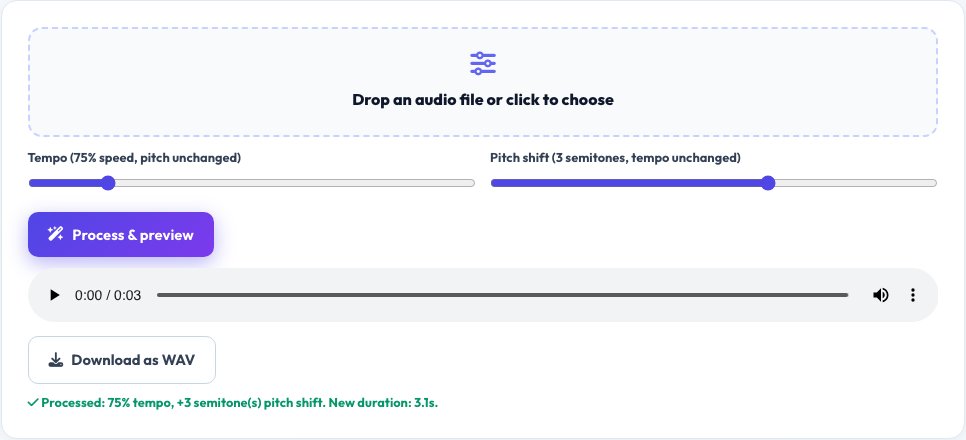
Audio Pitch & Tempo Changer
Simply changing an audio file's playback rate speeds it up or slows it down but also shifts the pitch along with it — a real, different problem from what a musician learning a song by ear, or someone needing content at a different pace without a chipmunk or slow-motion voice effect, actually needs. This tool implements a real granular time-stretching algorithm directly on the decoded audio samples: tempo can be changed independently of pitch (speed up or slow down while the pitch stays the same), and pitch can be changed independently of tempo (shift the key while the duration stays the same).
Both controls work on the file's real decoded waveform using the Web Audio API and an overlap-add resampling technique — a genuine, if not studio-mastering-grade, signal processing method, not a simple playback-rate trick, so the two effects can be dialed in separately or combined.
Key features
True independent pitch control
Shift pitch up or down while duration and speed stay the same, using real time-stretch compensation.
True independent tempo control
Speed up or slow down playback while pitch stays natural, using a real granular time-stretching algorithm.
Combine both
Apply a pitch shift and a tempo change together for a fully custom result.
Download the processed audio
Export the result as a real WAV file once you're happy with the preview.
How to use it
- Upload an audio file.
- Adjust the tempo slider to speed up or slow down without changing pitch, and/or the pitch slider to shift key without changing speed.
- Preview the result directly in the browser.
- Download the processed audio as a WAV file.
Worked example
Example
A song slowed to 75% tempo for learning a guitar solo by ear keeps its original pitch/key intact at the slower speed, thanks to the real time-stretching algorithm — unlike simply changing the playback rate, which would also drop the pitch and make it sound noticeably lower and different from the original recording.
Who uses this tool
Musicians learning a song by ear
Slow a recording down without dropping its pitch out of the original key.
Podcasters and language learners
Slow down speech for clarity or speed it up for faster review, without an unnatural pitch shift.
Content creators wanting a pitch-shifted voice or music effect
Shift pitch independently for a creative effect while keeping the original timing.
Tips for the best results
- This uses a real, from-scratch granular time-stretching algorithm rather than a professional studio plugin — quality is genuinely usable for practice, review and creative effects, but extreme settings (very large pitch shifts or tempo changes) can introduce audible artifacts, which is an honest, expected limitation of this class of algorithm.
- Smaller adjustments (within roughly ±30-40%) generally sound the cleanest; very large shifts push the algorithm harder and the artifacts become more noticeable.
- Processing happens after upload and before playback, so larger files take a moment to process — this is expected, not a stall.
Common mistakes to avoid
- Expecting studio-mastering-grade quality at extreme pitch or tempo settings — this is a real, genuine algorithm with honest limitations, not a professional audio suite.
- Confusing this with the site's Audio Format Converter (which only changes file format) or Audio Cutter (which only trims audio) — neither of those tools changes pitch or tempo at all.
- Applying a large tempo change and a large pitch change simultaneously and expecting perfectly clean results — combining two aggressive transforms compounds the artifacts of each.
Why use AZRS QuickFix?
It is 100% free, needs no signup and has no watermark or usage limits. The tool runs in your browser, so what you type stays on your device, and it works on phones, tablets and desktops. New tools are added every week — bookmark this page or browse the full QuickFix toolbox.
Frequently asked questions
How is this different from just changing playback speed?
Simply changing an audio element's playback rate speeds up or slows down the sound and shifts its pitch along with it (like a chipmunk effect or a slowed-down record). This tool uses a real time-stretching algorithm to decouple the two, so you can change tempo while pitch stays natural, or change pitch while tempo/duration stays the same.
How is this different from the Audio Cutter or Audio Format Converter?
Audio Cutter trims/removes sections of an audio file; Audio Format Converter changes the file's format (WAV/MP3). Neither of those tools touches pitch or tempo at all — this is a distinct, dedicated tool for that specific transformation.
Will the output sound perfectly clean?
For moderate adjustments, yes, it sounds genuinely natural; for very large pitch or tempo changes, some artifacts (a slightly grainy or warbly quality) are an honest, expected limitation of real-time granular time-stretching, the same tradeoff present in this class of algorithm generally.
What output format do I get?
A real WAV file, preserving full quality of the processed audio without adding further lossy compression.
Is my audio uploaded anywhere?
No, it's decoded, processed and re-encoded entirely in your browser using the Web Audio API.
Is my data stored?
No, nothing is saved after you leave the page.