Password Generator
Create strong, random passwords · free, no signup
See Password Generator in action
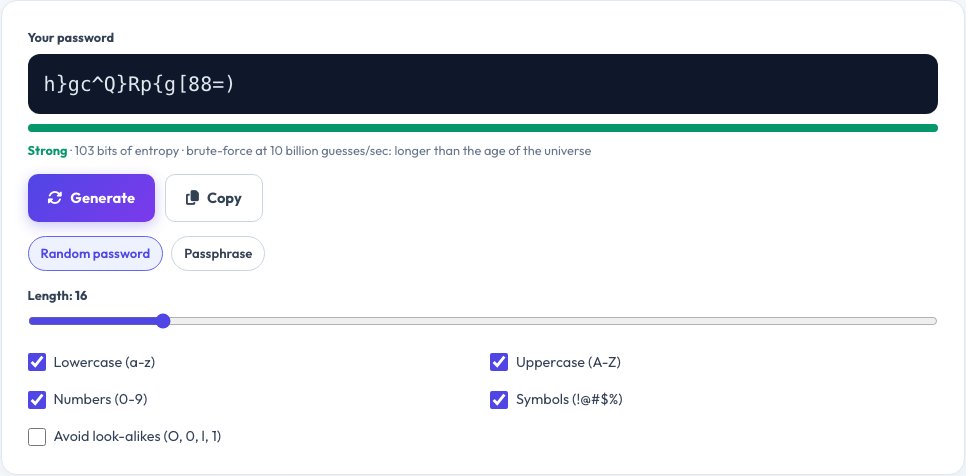
Free Strong Password Generator
A strong password is long, random and unique to each account. This generator creates passwords in your browser using your device's cryptographic random number generator, so the result is never sent to a server or saved anywhere.
Pick a length from 8 to 64 characters, choose which character types to include and copy the result. A built-in strength meter shows how hard the password would be to guess, and passphrase mode builds memorable multi-word passwords.
Key features
Cryptographically random
Uses the browser's secure random generator, not Math.random.
Private by design
Passwords are created on your device and never leave it.
Passphrase mode
Memorable words joined together, easy to type and very strong.
Strength meter
See estimated entropy and how long a guess attack would take.
How to use it
- Choose a length (16 or more is recommended).
- Select letters, numbers and symbols.
- Click Generate and copy the password.
- Store it in a password manager.
Worked example
Example
Length 16, letters + numbers + symbols
→ k9#Tq2vL!xR7mZ4p   (strength: very strong, ≈ 100 bits of entropy)
Passphrase mode → maple-orbit-vivid-canyon-lantern
Who uses this tool
Everyone with online accounts
Create a unique password for banking, email and social media.
IT teams and developers
Generate test credentials and API secrets.
Parents and students
Set up safer accounts for the whole family.
Tips for the best results
- Use at least 14–16 characters for important accounts.
- Store passwords in a reputable password manager.
- Turn on two-factor authentication wherever it is offered.
- Use passphrase mode for passwords you must type by hand.
Common mistakes to avoid
- Reusing one password across many sites.
- Using personal details such as names or birthdays.
- Saving passwords in plain text notes or email drafts.
Why use AZRS QuickFix?
It is 100% free, needs no signup and has no watermark or usage limits. The tool runs in your browser, so what you type stays on your device, and it works on phones, tablets and desktops. New tools are added every week — bookmark this page or browse the full QuickFix toolbox.
Frequently asked questions
How long should my password be?
At least 14 to 16 characters. Longer is better, and length matters more than complexity.
Is this password generator safe?
Yes. Passwords are generated locally with the Web Crypto API and are never transmitted or stored.
Should I reuse passwords?
No. Use a unique password for every account and keep them in a password manager.
What is a passphrase?
A password made of several random words. It is long, easy to remember and hard to crack.
Does this tool store my passwords?
No. They are generated in your browser and never leave your device.
Are symbols necessary?
They add strength, but length matters most. A long passphrase is also very strong.