Drawing Sheet Border & Title Block Generator (A4–A0, ANSI) SVG / DXF
Create ISO or ANSI drawing sheets with border, zone references and a filled-in title block as SVG or DXF · free, no signup
Export
See Drawing Sheet Border & Title Block Generator (A4–A0, ANSI) SVG / DXF in action
Free Drawing Sheet & Title Block Generator
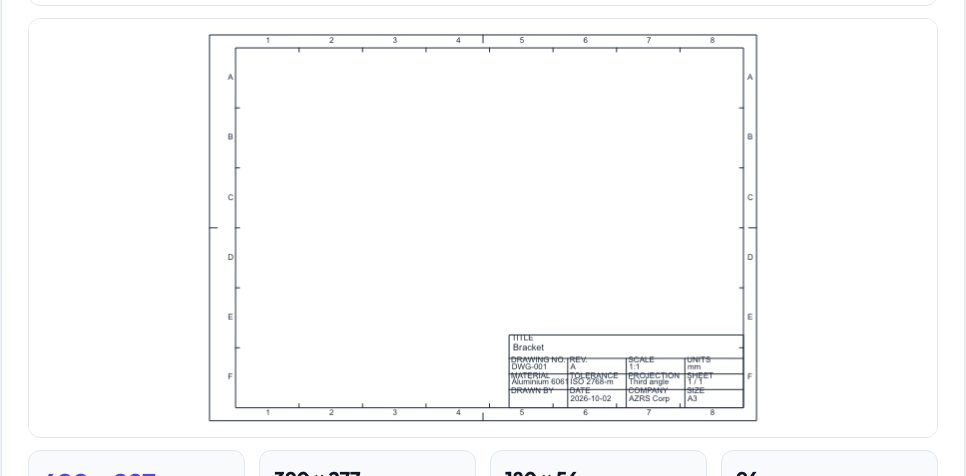
Every engineering drawing starts with a sheet: border, title block, scale and revision. This tool builds a clean drawing template for A4–A0, US Letter, Legal and ANSI A–E sizes in landscape or portrait with the border margin and binding margin you choose, optional grid zone references (A–D, 1–6) and a title block laid out as in ISO 7200 with title, drawing number, revision, scale, units, material, tolerance, projection, drawn by, date and company.
The live preview updates as you type. Download the sheet as SVG for printing at 100% or as DXF to import into any CAD program. Everything is created in your browser.
Key features
ISO and ANSI sizes
A4–A0, Letter, Legal, ANSI A–E, Arch D.
Filled title block
All the usual fields.
Zone references
Optional letters and numbers.
SVG and DXF
Print or import into CAD.
How to use it
- Choose sheet size and orientation.
- Fill in the title block.
- Check the preview.
- Download SVG or DXF.
Worked example
Example
An A3 landscape sheet (420 × 297 mm) with 10 mm margins and a 10 mm binding margin leaves a drawing area of 390 × 277 mm, with a 180 × 56 mm title block in the lower right corner.
Who uses this tool
Students
Standard sheets for assignments.
Engineers
Quick templates.
Makers
Frames for documentation.
Teachers
Consistent sheet formats.
Tips for the best results
- Print the SVG at 100%.
- Use the DXF as a block in CAD.
- Keep the binding margin on the left.
- Update revision when you change the drawing.
Common mistakes to avoid
- Printing with fit to page.
- Mixing first-angle and third-angle drawings.
- Forgetting to set units.
Why use AZRS QuickFix?
It is 100% free, needs no signup and has no watermark or usage limits. The tool runs in your browser, so what you type stays on your device, and it works on phones, tablets and desktops. New tools are added every week — bookmark this page or browse the full QuickFix toolbox.
Frequently asked questions
Is it ISO 7200?
The layout follows its field arrangement.
Can I change colours?
Edit the SVG or DXF layers afterwards.
What size is the title block?
Up to 180 × 56 mm.
Is it free?
Yes.