PDF Splitter by Text Match
Split a PDF into separate files automatically at every page containing a real text or regex match you specify · free, no signup
See PDF Splitter by Text Match in action
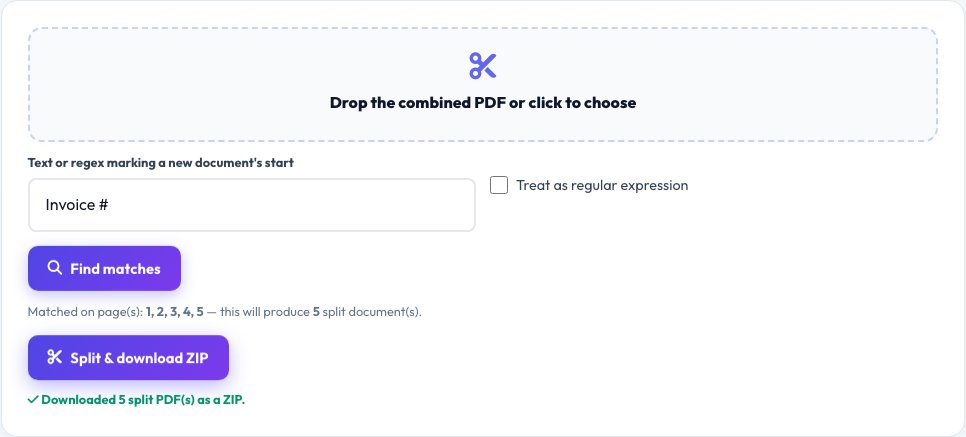
PDF Splitter by Text Match
A plain page-range PDF splitter (like this site's existing PDF Splitter) is great when you already know exactly which page numbers to cut at. This tool solves a different, smarter problem: it uses pdf.js to actually extract the real text content of every page, searches for a phrase or regular expression you specify (like 'Invoice #' or a regex matching a document ID), and automatically splits the PDF into separate files starting at every page where that real match is found.
This is the tool for a batch of scanned invoices, statements or reports merged into one long PDF, where each document starts with a recognizable heading or ID — instead of manually figuring out page numbers, you give it the real recurring text pattern and it finds every genuine boundary and rebuilds each section as its own downloadable PDF, zipped together.
Key features
Real text extraction, not OCR guessing
Uses pdf.js to read each page's actual embedded text content for genuinely reliable matching on text-based PDFs.
Regex support
Match a flexible pattern (like an invoice number format), not just one exact fixed phrase.
Automatic boundary detection
No need to know page numbers — the tool finds every real match and splits there automatically.
All resulting PDFs zipped together
Every split section downloads as its own properly named PDF, bundled into one ZIP.
How to use it
- Upload the combined PDF.
- Enter the exact text or a regular expression that marks the start of each new document.
- Click Split — the tool scans every page's real text and finds every match.
- Download a ZIP containing each split section as its own PDF.
Worked example
Example
A 60-page PDF containing 15 scanned invoices, each starting with a page containing the text 'Invoice #', is split into 15 separate PDFs — one per invoice — automatically at every page where 'Invoice #' was genuinely found in that page's real text.
Who uses this tool
Anyone with scanned invoices, statements or reports merged into one file
Split automatically at every real document boundary instead of manually counting pages.
Admin and bookkeeping staff processing batch-scanned documents
Turn one long scan into individually named files per document in one step.
Anyone receiving a combined PDF from a client or scanner
Split it into the separate documents it was originally meant to be.
Tips for the best results
- This relies on each page having real, extractable text content — a fully scanned image-only PDF with no text layer (no OCR applied) has no text for pdf.js to search, so text-based splitting won't find matches on those pages.
- A regular expression gives much more flexible matching than a fixed phrase — for example, an invoice number pattern like Invoice #\d{4,} matches any 'Invoice #' followed by 4 or more digits, catching variations a fixed phrase would miss.
- Preview the detected match pages before finalizing if the tool offers a preview, to confirm the split points are exactly where you expect before downloading.
Common mistakes to avoid
- Trying this on a scanned PDF with no real text layer, where there's nothing for pdf.js to search — an OCR step would be needed first to add searchable text.
- Using an overly broad search phrase that also matches within a document's body text (not just at document starts), causing extra unwanted splits.
- Forgetting that regex special characters (like . or #) may need escaping if you actually want to match them literally rather than as pattern syntax.
Why use AZRS QuickFix?
It is 100% free, needs no signup and has no watermark or usage limits. The tool runs in your browser, so what you type stays on your device, and it works on phones, tablets and desktops. New tools are added every week — bookmark this page or browse the full QuickFix toolbox.
Frequently asked questions
How is this different from the existing plain PDF Splitter?
The existing splitter cuts a PDF at page numbers or ranges you specify manually. This tool instead searches every page's real text content for a phrase or regex you give it and automatically finds and splits at every genuine match — useful when you don't already know the page numbers, only the recurring text pattern that marks each new document.
Does it work on scanned (image-only) PDFs?
Only if those pages already have a real text layer (for example, from a prior OCR pass) — pdf.js can only search text that's actually embedded in the PDF, not text baked into a flat image.
Can I use a regular expression instead of a fixed phrase?
Yes — enter a valid regex and the tool matches it against each page's real extracted text, which is much more flexible than one exact phrase.
What if my match phrase appears on more pages than expected?
Every genuine match becomes a split point, so an overly common phrase will over-split — use a more specific phrase or regex that only appears where you actually want a new document to start.
Is the PDF uploaded to a server?
No, both the text extraction (pdf.js) and the PDF rebuilding (pdf-lib) happen entirely in your browser.
Is my data stored?
No, nothing is saved after you leave the page.