URL Slug Generator
Turn titles into clean SEO-friendly slugs · free, no signup
See URL Slug Generator in action
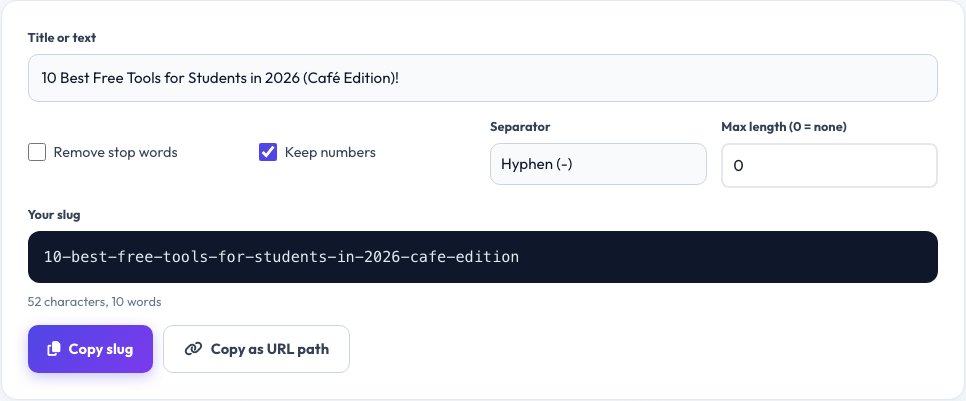
Free SEO-Friendly URL Slug Generator
A slug is the readable part of a web address, like /free-password-generator/. Short, descriptive slugs help both visitors and search engines understand a page. This tool turns any title into a clean slug: lowercase, hyphen-separated, with accents and punctuation removed.
Optionally strip common stop words such as 'a', 'the' and 'of' to keep URLs short, set a maximum length and choose your separator.
Key features
Accent aware
Converts é, ñ, ü and more to plain letters.
Stop-word removal
Shorter, cleaner URLs.
Custom separator
Hyphen or underscore.
Length limit
Trim slugs to your preferred length.
How to use it
- Type or paste a title.
- Choose options such as stop words and length.
- Copy the slug.
- Use it in your permalink.
Worked example
Example
Title:  Hello World! Café & Tea in 2026?
Slug:   hello-world-cafe-tea-in-2026
Who uses this tool
Bloggers and editors
Create clean, readable post URLs.
SEO specialists
Follow URL best practices at scale.
Developers
Generate safe file names and route keys.
Tips for the best results
- Keep slugs short: 3–6 meaningful words.
- Use hyphens, not underscores, to separate words.
- Remove stop words like “the” if it keeps the slug clear.
- Never change a live URL without a redirect.
Common mistakes to avoid
- Leaving dates or IDs that will change.
- Using capital letters or spaces.
- Stuffing keywords into a very long slug.
Why use AZRS QuickFix?
It is 100% free, needs no signup and has no watermark or usage limits. The tool runs in your browser, so what you type stays on your device, and it works on phones, tablets and desktops. New tools are added every week — bookmark this page or browse the full QuickFix toolbox.
Frequently asked questions
What makes a good URL slug?
Short, lowercase, descriptive, separated by hyphens, and free of special characters.
Hyphens or underscores?
Google recommends hyphens because they separate words clearly.
Should I remove stop words?
It is optional. Removing them shortens the URL, but keep any that change the meaning.
Can I change a slug later?
Yes, but set up a 301 redirect from the old URL to keep your rankings.
Why use hyphens in URLs?
Search engines treat hyphens as word separators; underscores are not.
Are accented characters allowed?
They are converted to plain letters so the URL stays universal.