Video to GIF Converter
Convert a real video clip into an animated GIF with real frame-rate, size and trim-range controls, entirely in your browser · free, no signup
See Video to GIF Converter in action
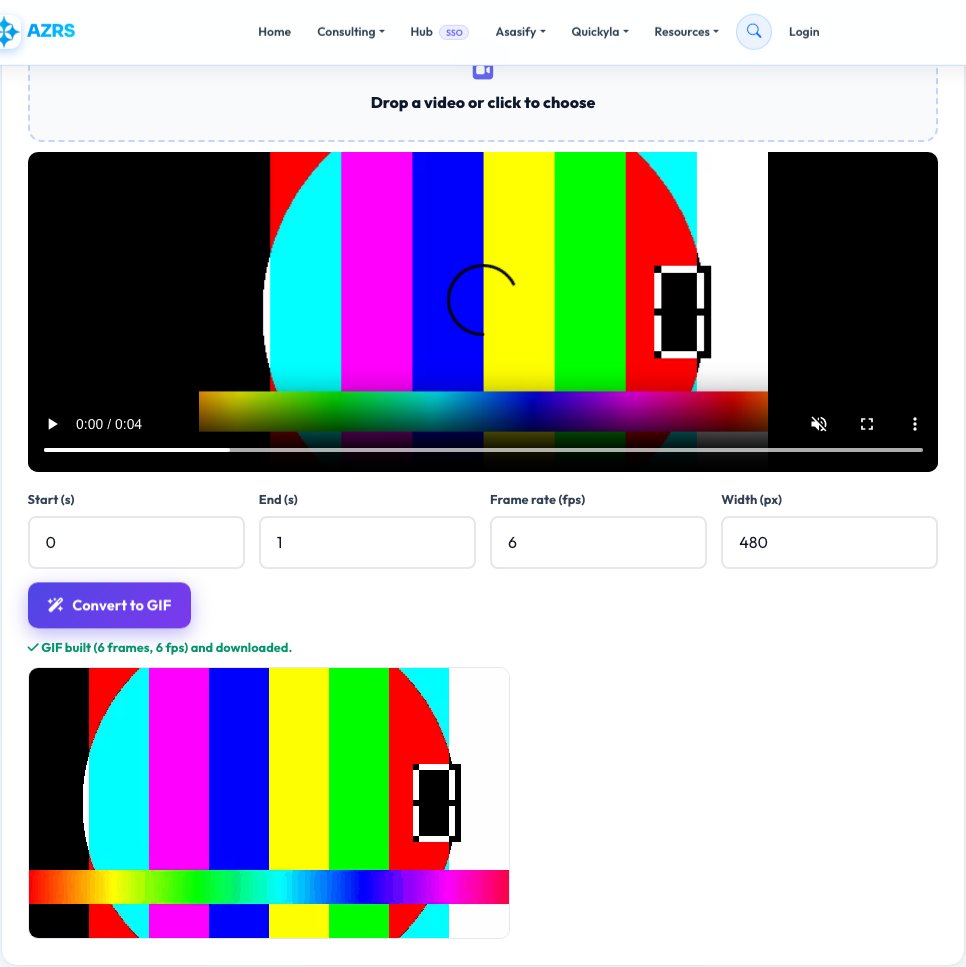
Video to GIF Converter
This site's existing GIF Maker turns a series of separate photos into an animated GIF. This is a different tool for a different real need: taking one continuous video clip and converting a real trimmed segment of it into a GIF. It loads your video file, lets you set a start and end point on the real timeline, then steps through that range extracting actual video frames to a canvas at your chosen frame rate.
Each extracted frame is encoded into a real animated GIF using the same GIF-encoding approach as elsewhere on this site, with an adjustable output width to control file size. Because it samples genuine frames directly from your video at the exact rate and range you choose, the result is a true video-to-GIF conversion, not a slideshow of manually selected images.
Key features
Real video frame extraction
Samples actual frames from your video file at your chosen frame rate, not manually picked photos.
Real trim range on the video's own timeline
Set an exact start and end point to convert only the part of the video you want.
Adjustable frame rate and output width
Balance smoothness and file size for your specific clip.
Distinct from the photo-based GIF Maker
Purpose-built for converting an existing video clip, not assembling separate still photos.
How to use it
- Upload your video file.
- Set the start and end time of the segment you want as a GIF.
- Choose the frame rate and output width.
- Click Convert — the tool extracts real frames and downloads the finished animated GIF.
Worked example
Example
A 6-second clip from a longer video, converted at 10 frames per second and 480px width, produces a real 60-frame animated GIF covering exactly that 6-second segment, ready to share anywhere GIFs are supported.
Who uses this tool
Anyone turning a video highlight into a shareable GIF
Convert a real clip segment directly, without a separate desktop video editor.
Social media and forum users
Produce a GIF from an existing video for platforms that don't support video uploads or autoplay.
Anyone documenting a short interaction or bug from a screen recording
Convert the relevant seconds of a recorded video into an easy-to-embed GIF.
Tips for the best results
- Longer clips and higher frame rates produce larger GIF files — trim to the shortest segment that makes your point and use a moderate frame rate (8-12fps) for a good size/smoothness balance.
- GIFs don't support real audio, so any sound in your source video is dropped in the conversion, same as any GIF format everywhere.
- A smaller output width significantly reduces file size with often little visible quality loss for typical GIF use (chat, social posts) — try 400-480px before going larger.
Common mistakes to avoid
- Converting a very long clip at a high frame rate and ending up with an unexpectedly huge GIF file — trim the range and lower the frame rate for anything meant to be shared easily.
- Expecting sound to carry over — GIF is a silent format by definition, this is not a limitation specific to this tool.
- Not previewing the trim range first — always check the start/end points look right before converting a long video.
Why use AZRS QuickFix?
It is 100% free, needs no signup and has no watermark or usage limits. The tool runs in your browser, so what you type stays on your device, and it works on phones, tablets and desktops. New tools are added every week — bookmark this page or browse the full QuickFix toolbox.
Frequently asked questions
How is this different from the site's GIF Maker?
GIF Maker builds an animated GIF from a set of separate photos you upload in order. This tool instead takes one continuous video file and extracts real frames from a trimmed segment of it, which is a genuinely different source and workflow.
Does the GIF include sound?
No — the GIF image format doesn't support audio at all, so any audio in the source video is not included, the same as any video-to-GIF conversion anywhere.
What frame rate should I use?
Somewhere around 8-15 frames per second is a common balance between smooth motion and reasonable file size for sharing; higher frame rates look smoother but produce larger files.
Is there a length limit?
No hard limit is enforced, but longer clips and higher frame rates/resolutions increase processing time and file size significantly since everything runs on your device.
Is my video uploaded anywhere?
No — frames are extracted to a canvas and encoded into a GIF entirely in your browser; the video file never leaves your device.
Is my data stored?
No, nothing is saved after you leave the page.