Material Weight Calculator (Steel, Aluminium, Plastics, Wood…)
Weight from dimensions and density for plates, bars, tubes, pipes and more · free, no signup
Weight of a 3D model — optional: drop an STL / 3MF / OBJ / STEP and its volume is used
See Material Weight Calculator (Steel, Aluminium, Plastics, Wood…) in action
Free Material Weight Calculator
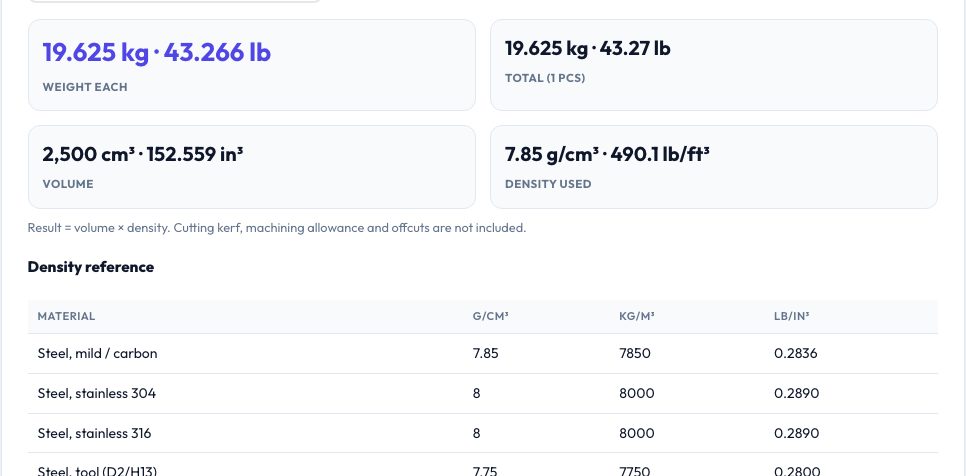
Choose a shape — plate, round bar, square bar, flat bar, round tube, rectangular tube, hex bar, sphere, hollow cylinder or a known volume — enter the dimensions in mm, cm, m, inches or feet, pick one of 40 materials (carbon and stainless steel, tool steel, cast iron, several aluminium alloys, copper, brass, bronze, titanium, zinc, lead, nickel, magnesium, precious metals, concrete, glass, woods, common plastics and 3D-printing filaments) or type a custom density, and the calculator returns the weight per piece and for the whole quantity in kg and lb, plus the volume.
Add a price per kg to get the material cost. A density reference table lists every material in g/cm³, kg/m³ and lb/in³. It is useful for estimating shipping weight, machining stock cost, crane loads, centre of gravity inputs for CAD assemblies or the printed weight of a part.
Key features
Ten shapes
Plates, bars, tubes, pipes, hex, sphere or a known volume.
40 materials
Metals, woods, plastics, filaments, concrete and more, plus custom density.
kg and lb
Per piece and per batch with volume in cm³ and in³.
Cost estimate
Material cost from price per kg.
How to use it
- Select the shape and unit.
- Pick the material or enter a custom density.
- Enter the dimensions and quantity.
- Read the weight, volume and cost.
Worked example
Example
A 1000 × 500 × 5 mm mild-steel plate weighs 19.6 kg (43.2 lb); a Ø20 × 1000 mm aluminium 6061 bar weighs 0.85 kg; a 50 mm hollow steel pipe with 40 mm bore and 1 m length weighs 5.5 kg.
Who uses this tool
Fabricators and machinists
Quote stock weight and cost.
Engineering students
Check mass in design projects.
Makers
Estimate shipping and print weights.
Tips for the best results
- For standard sections use mill-sheet weights when exact.
- Densities vary by alloy and temper — use a custom density for exact values.
- Add 5–10% for offcuts when buying stock.
- Convert dimensions to the chosen unit before entering them.
Common mistakes to avoid
- Mixing units between dimensions.
- Using steel density for stainless in precise work (about 2% different).
- Forgetting hollow sections have an inner dimension.
Why use AZRS QuickFix?
It is 100% free, needs no signup and has no watermark or usage limits. The tool runs in your browser, so what you type stays on your device, and it works on phones, tablets and desktops. New tools are added every week — bookmark this page or browse the full QuickFix toolbox.
Frequently asked questions
How is weight calculated?
Volume × density, with volume from standard formulas for each shape.
Are the densities exact?
They are typical values; alloys vary by a few percent.
Can I use pounds and inches?
Yes — pick inches or feet as the dimension unit; the answer is given in kg and lb.
Does it include coatings?
No.