Laser Cutter SVG & DXF Cleaner (Join Paths, Remove Duplicates, Order Cuts)
Fix messy cutting files: join loose lines, remove double cuts, close gaps and order cuts inside-out · free, no signup
See Laser Cutter SVG & DXF Cleaner (Join Paths, Remove Duplicates, Order Cuts) in action
Free Laser Cutting File Cleaner (SVG & DXF)
Laser and CNC cutting files rarely arrive clean: a CAD export is thousands of loose line segments with tiny gaps at the corners, a design with touching shapes has the shared edge drawn twice (so the laser cuts it twice and chars the wood), an image trace leaves specks and a thousand nodes, and the cut order is whatever order the objects happened to be drawn in. This tool reads an SVG or DXF and fixes all of that in one pass: it snaps nearby end points, merges coincident segments, traces the geometry into continuous paths, closes small gaps, removes duplicate lines and circles, drops tiny specks, optionally simplifies curves, and re-orders the cuts so inside shapes (holes) are cut before the outer contour with the shortest travel in between.
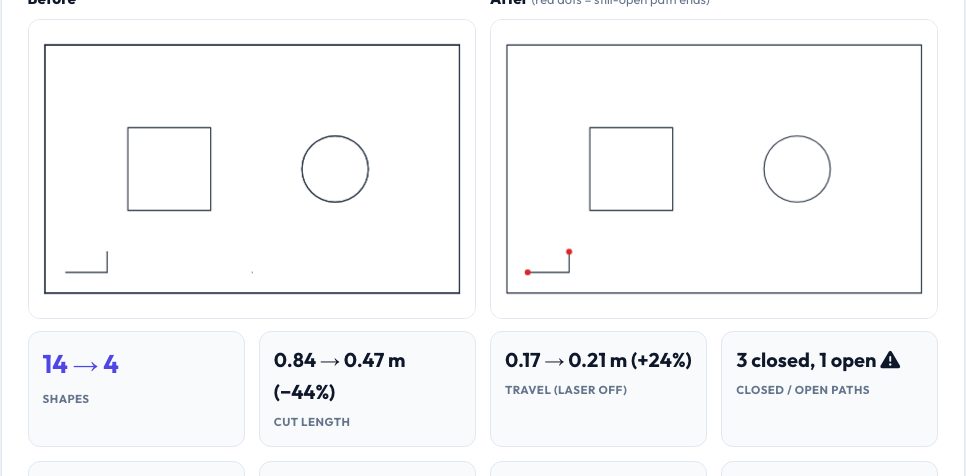
A before-and-after preview with red dots on any path that is still open shows what changed, and the statistics report cut length and laser-off travel distance before and after, the duplicates removed, gaps closed and nesting depth. Download the result as a clean SVG (choose the stroke colour and width) or a DXF. It works on straight and curved geometry, handles layers separately unless you merge them, and never uploads your file.
Key features
Join and snap
Loose segments become continuous paths; near points are snapped.
Remove double cuts
Duplicate lines and circles are deleted so nothing is cut twice.
Close gaps and drop specks
Small gaps are closed; tiny shapes and noise removed.
Cut-order optimisation
Holes first, then outlines, with minimum laser-off travel.
How to use it
- Drop in the SVG or DXF.
- Adjust the tolerance, gap closing and speck size.
- Check the after preview for red open ends.
- Download the cleaned SVG or DXF.
Worked example
Example
A box drawn as four loose lines with 0.005 mm gaps, a duplicate copy of the same box, a doubled circle, a speck and an inner square becomes one closed rectangle, one square and one circle, cut circle → inner square → outer rectangle, with the total cut length reduced by about 40%.
Who uses this tool
Laser cutter owners
Prepare files from CAD, trace or downloads for LightBurn and LaserGRBL.
CNC and plasma users
Remove double passes and closed-path errors.
Makers and sellers
Cleaner files cut faster, char less and use less machine time.
Tips for the best results
- Increase the join tolerance if corners still do not close (try 0.05–0.1 mm).
- Keep layers separate unless the design relies on cross-layer joins.
- Use simplify to reduce huge node counts from traced images.
- Always check the preview before cutting.
Common mistakes to avoid
- Using a tolerance larger than the smallest detail in the design.
- Ignoring open paths that a fill or cut-out cannot use.
- Expecting partly overlapping collinear lines to be merged.
Why use AZRS QuickFix?
It is 100% free, needs no signup and has no watermark or usage limits. The tool runs in your browser, so what you type stays on your device, and it works on phones, tablets and desktops. New tools are added every week — bookmark this page or browse the full QuickFix toolbox.
Frequently asked questions
What counts as a duplicate?
Segments with the same two end points (after snapping) and identical circles.
Why cut inside shapes first?
So the part cannot move before its holes are cut.
Does it keep curves?
Curves are kept as polylines accurate to 0.02 mm.
Is my file uploaded?
No, processing is in your browser.