Online Alarm Clock
Free alarm clock with sounds, repeat days, snooze and quick timers — right in your browser · free, no signup
See Online Alarm Clock in action
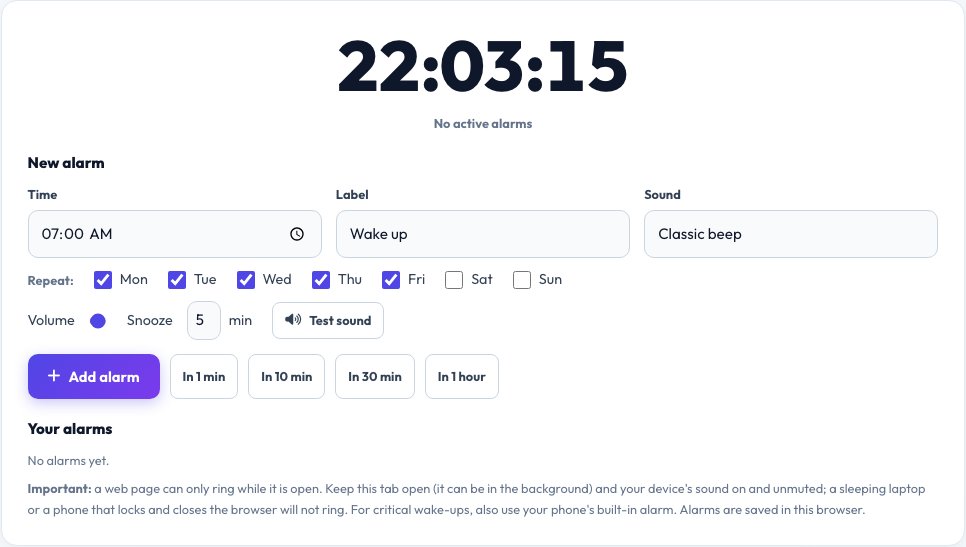
Free Online Alarm Clock — Alarms, Snooze and Quick Timers
Set an alarm for any time of day directly in your browser. Give it a label, choose the days it repeats (or leave it as a one-off), pick a sound — classic beep, gentle chime, loud siren or rising tones — and set the volume. When the time comes, the page rings, shows a large alert, changes the tab title so you notice, and offers a Snooze button (5, 10 or 15 minutes) and a Stop button.
You can keep several alarms, switch each on or off, and start a quick timer with one click — in 1, 10, 30 or 60 minutes. Alarms are saved in your browser so they are still there tomorrow. The important limit: a web page can only ring while it is open and your device is awake with the sound on, so keep the tab open and use your phone's own alarm for anything critical.
Key features
Multiple alarms with labels
Repeat on chosen days, or once.
Four alarm sounds
Beep, chime, siren and rising tones with volume control.
Snooze and quick timers
5/10/15-minute snooze; 1/10/30/60-minute timers.
Saved in your browser
Alarms survive a reload.
How to use it
- Pick a time, label, sound and repeat days.
- Click Add alarm (or a quick timer button).
- Keep the tab open with sound on.
- When it rings, press Snooze or Stop.
Worked example
Example
07:00 “Wake up” on Mon–Fri with the gentle chime; a 30-minute timer for the oven.
Who uses this tool
Students and remote workers
Reminders for classes, calls and breaks.
Cooks and DIYers
Quick timers while you work.
Anyone at a computer
A simple alarm without an app.
Tips for the best results
- Use Test sound first and set your system volume.
- Disable sleep or battery-saver so the device stays awake.
- Keep the tab open (a background tab is fine).
- Use a second alarm as a backup for important events.
Common mistakes to avoid
- Closing the tab or letting the computer sleep — the alarm cannot ring.
- Muting the tab or the device.
- Relying on it as your only wake-up alarm.
Why use AZRS QuickFix?
It is 100% free, needs no signup and has no watermark or usage limits. The tool runs in your browser, so what you type stays on your device, and it works on phones, tablets and desktops. New tools are added every week — bookmark this page or browse the full QuickFix toolbox.
Frequently asked questions
Will the alarm ring if I close the tab?
No. A web page can only ring while it is open. Keep the tab open, or use your phone's alarm for critical wake-ups.
Does it work in a background tab?
Yes, though some browsers may delay timers slightly in very long-idle tabs.
Are my alarms saved?
Yes, in this browser's storage, and only there.
How do I make a one-time alarm?
Untick all the repeat days, or use a quick timer button.
Can it show a notification?
If you allow notifications it also shows one when the alarm rings.
Is there a limit on alarms?
No fixed limit.