Online Metronome & Tap Tempo
A precise metronome with tap tempo, accents, time signatures and subdivisions · free, no signup
See Online Metronome & Tap Tempo in action
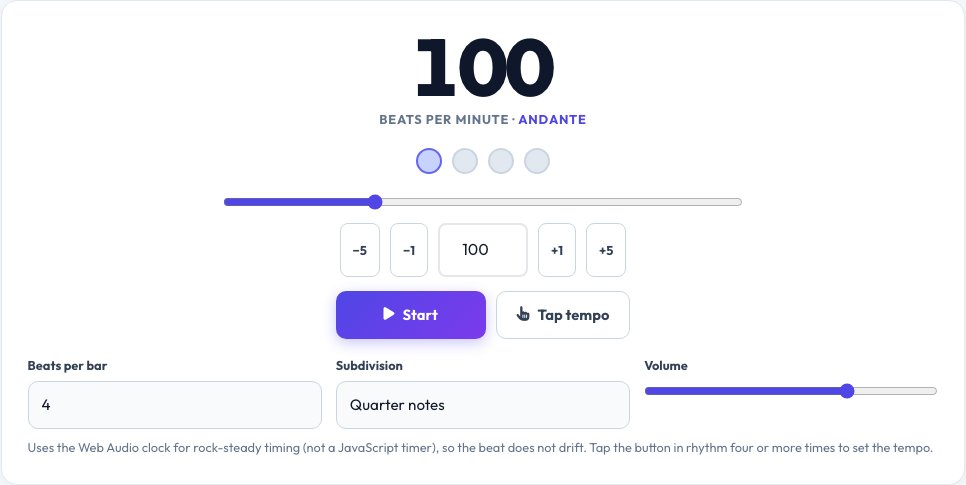
Free Online Metronome — Precise Tempo with Tap Tempo
A metronome gives musicians a steady beat to practise against. This online metronome schedules every click with the Web Audio clock instead of an ordinary JavaScript timer, so the tempo stays rock steady even when the tab is busy — the usual reason simple web metronomes drift or stutter.
Set any tempo from 20 to 300 beats per minute with the slider, number box or the ±1 and ±5 buttons, and see the traditional Italian tempo name (Andante, Allegro and so on). Choose 1 to 12 beats per bar with an accented first beat, add eighth notes, triplets or sixteenth notes, adjust the volume, or tap the Tap Tempo button along with a song to find its BPM.
Key features
Web Audio timing
Sample-accurate clicks that do not drift.
Tap tempo
Tap along to any song to measure its BPM.
Bars and accents
1–12 beats per bar with an accented downbeat.
Subdivisions
Eighths, triplets and sixteenths for practising rhythm.
How to use it
- Set the tempo with the slider, number box or by tapping.
- Choose beats per bar and a subdivision.
- Press Start (or the space bar) and play along.
- Adjust the volume and tempo as you improve.
Worked example
Example
Tap four times about 0.6 seconds apart → 100 BPM (Andante).
4 beats per bar, eighth-note subdivision → click on every half beat, accent on beat 1.
Who uses this tool
Musicians and students
Practise scales, pieces and rhythm at a steady tempo.
Drummers and producers
Work out the BPM of a track or set a click.
Dancers and runners
Keep a steady cadence at a chosen beat.
Tips for the best results
- Start slower than you think and increase 5 BPM at a time.
- Turn on subdivisions when practising fast passages.
- Use headphones for a clearer click over your instrument.
- Tap at least 6 times for an accurate BPM.
Common mistakes to avoid
- Practising only at your comfortable speed.
- Tapping irregularly, which gives a wrong average.
- Relying on a phone speaker that is too quiet to hear over an instrument.
Why use AZRS QuickFix?
It is 100% free, needs no signup and has no watermark or usage limits. The tool runs in your browser, so what you type stays on your device, and it works on phones, tablets and desktops. New tools are added every week — bookmark this page or browse the full QuickFix toolbox.
Frequently asked questions
How accurate is this metronome?
Clicks are scheduled ahead on the audio clock, so timing does not drift the way timer-based metronomes do.
How does tap tempo work?
It averages the time between your last several taps and converts it to beats per minute.
What BPM should I practise at?
Start at a speed you can play perfectly, then raise it gradually.
What does Andante or Allegro mean?
They are traditional Italian tempo names: Andante is walking pace (76–108 BPM), Allegro is fast (120–156 BPM).
Can I change the time signature?
Yes — choose 1 to 12 beats per bar. The first beat is accented.
Does it work offline?
Once the page is loaded it keeps working without a connection.