Arduino, ESP32, Pico & ESP8266 Pinout Reference
Searchable pin functions, PWM/ADC/I²C/SPI pins and boot-strapping warnings for popular boards · free, no signup
See Arduino, ESP32, Pico & ESP8266 Pinout Reference in action
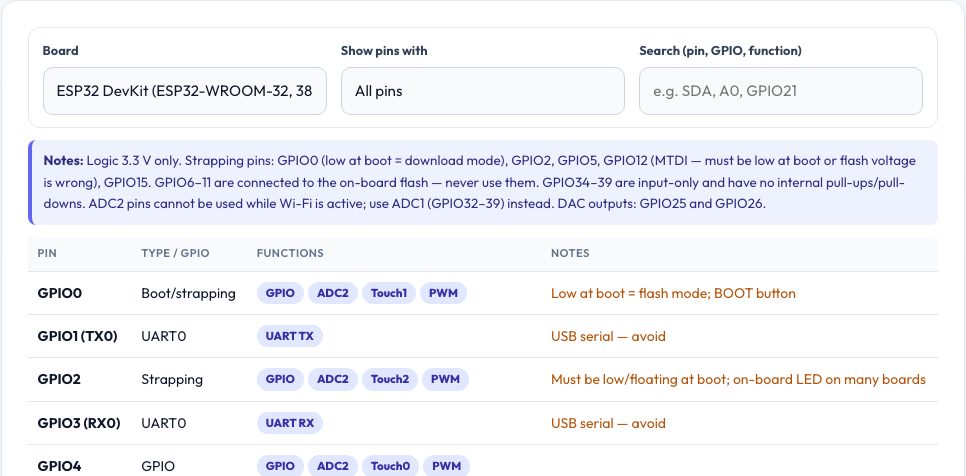
Free Microcontroller Pinout Reference
Picking pins is where microcontroller projects quietly go wrong: an ESP32 that will not boot because a sensor pulls GPIO12 high, an Arduino whose serial upload fails because D0/D1 are in use, a Pico I²C bus on the wrong pins, an ADC that stops working when Wi-Fi starts. This reference lists the pins of four popular boards — Arduino Uno/Nano, ESP32 DevKit (38-pin), Raspberry Pi Pico and NodeMCU/Wemos D1 (ESP8266) — with what each can do (PWM, ADC, DAC, touch, I²C, SPI, UART, interrupts) and the traps to avoid.
Filter by function (for example 'I2C' or 'ADC') or search for a pin name, and boot-strapping pins, input-only pins, flash pins and USB-serial pins are highlighted. The notes also remind you of the logic level of each board — the ESP32, Pico and ESP8266 are 3.3 V only and not 5 V tolerant — and typical per-pin current limits. It is compiled from the manufacturers' datasheets; check your own board's silkscreen, because clones differ.
Key features
Four boards
Arduino Uno/Nano, ESP32 DevKit, Raspberry Pi Pico, NodeMCU ESP8266.
Filter by function
PWM, ADC, DAC, touch, I²C, SPI, UART, interrupts, power.
Warnings built in
Strapping, input-only, flash, USB-serial and boot-state notes.
Voltage and current notes
3.3 V vs 5 V logic and typical pin current limits.
How to use it
- Choose your board.
- Filter by the function you need or search for a pin.
- Read the notes for each pin before wiring.
- Pick pins that avoid the highlighted warnings.
Worked example
Example
On an ESP32, pick GPIO32–39 for analog input if Wi-Fi is used (ADC1), keep GPIO34–39 for inputs only, avoid GPIO0/2/12/15 for devices that pull them at boot, and use GPIO21/22 for the default I²C bus.
Who uses this tool
Hobbyists
Choose safe pins for sensors, displays and motors.
Students
Learn what each pin can do.
Makers
Debug boot and Wi-Fi problems caused by pin choice.
Tips for the best results
- Prefer pins with no special boot behaviour for outputs.
- Use level shifters between 5 V devices and 3.3 V boards.
- Check ADC2 vs ADC1 on the ESP32 when using Wi-Fi.
- Read your board's own schematic for on-board LED and button pins.
Common mistakes to avoid
- Wiring a 5 V sensor directly to an ESP32 or Pico.
- Using GPIO6–11 on an ESP32 (flash).
- Pulling a strapping pin high or low with a peripheral.
Why use AZRS QuickFix?
It is 100% free, needs no signup and has no watermark or usage limits. The tool runs in your browser, so what you type stays on your device, and it works on phones, tablets and desktops. New tools are added every week — bookmark this page or browse the full QuickFix toolbox.
Frequently asked questions
Are clone boards the same?
Often yes, but always check the silkscreen and schematic.
Does it include the Mega or STM32?
Not yet — the most-used four boards are covered.
Which pins are safe on the ESP32?
GPIO4, 13, 14, 16–19, 21–23, 25–27, 32, 33 for general use.
Is it free?
Yes.