Event Countdown Page Creator
Build a live countdown to any date — wedding, launch, birthday — with an embeddable snippet · free, no signup
See Event Countdown Page Creator in action
Free Event Countdown Page Creator
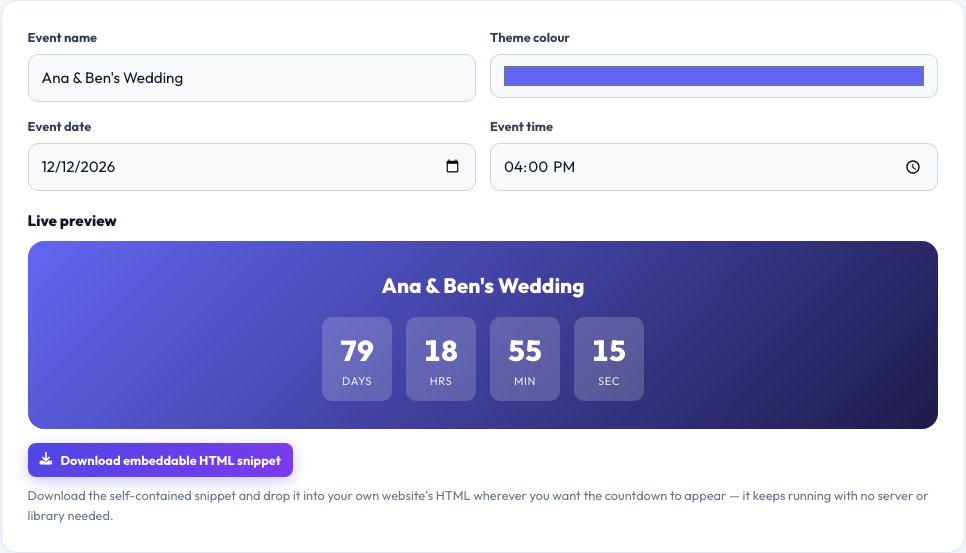
Whether it's a wedding, a product launch, a birthday or a deadline, a live countdown makes a date feel real in a way a plain calendar entry doesn't. Enter the event name, the target date and time, and an optional theme colour, and this tool builds a large, live-updating countdown in days, hours, minutes and seconds right in your browser — no page reload needed as time passes.
Beyond just viewing it here, you get a self-contained HTML snippet with the same countdown logic built in, which you can download and drop onto your own website, a Notion page, or anywhere that accepts embedded HTML, so the countdown keeps running wherever you place it — no server, database or JavaScript library required on your end.
Key features
Live countdown display
Days, hours, minutes and seconds update every second.
Custom event name and theme colour
Personalise it for a wedding, launch or birthday.
Downloadable embed snippet
Self-contained HTML you can drop onto your own site.
Runs past the deadline gracefully
Switches to a celebratory "It's here!" message at zero.
How to use it
- Enter your event name and the target date and time.
- Pick a theme colour for the countdown card.
- Watch the live countdown update on this page.
- Download the embed snippet to use it on your own site.
Worked example
Example
"Ana & Ben's Wedding", 2026-12-12 16:00 → live display: 79 days 04 hrs 12 min 08 sec and counting down every second.
Who uses this tool
Couples planning a wedding
Share a countdown on a wedding website.
Businesses launching a product
Build anticipation with a countdown embedded on a landing page.
Anyone marking a personal milestone
Birthdays, anniversaries, graduations, trip departures.
Tips for the best results
- Double-check the timezone your date is set in if you're sharing the countdown with people elsewhere.
- Keep the event name short — it displays best in one line above the numbers.
- Test the downloaded snippet on the actual site you'll embed it on, since some platforms strip script tags.
- For a shared link instead of an embed, just bookmark or share this tool's URL with your saved settings noted.
Common mistakes to avoid
- Setting the wrong timezone, so the countdown finishes earlier or later than intended for your actual audience.
- Embedding the snippet on a platform that blocks inline JavaScript, which stops the live update (the numbers will show but stay static).
- Forgetting to update the date if the event gets rescheduled.
Why use AZRS QuickFix?
It is 100% free, needs no signup and has no watermark or usage limits. The tool runs in your browser, so what you type stays on your device, and it works on phones, tablets and desktops. New tools are added every week — bookmark this page or browse the full QuickFix toolbox.
Frequently asked questions
Does the countdown keep running after I close this page?
Only if you embed the downloaded HTML snippet elsewhere — this page itself needs to stay open to keep counting live.
Can I embed it on my own website?
Yes, download the snippet and paste it into your site's HTML where you want the countdown to appear.
What happens when the countdown reaches zero?
It automatically switches to a celebratory "It's here!" message instead of showing negative numbers.
Does it account for my timezone?
Yes, the date and time you enter are treated in your browser's local timezone; make sure to communicate the right timezone if sharing with people elsewhere.
Can I change the theme colour?
Yes, pick any colour and both the live preview and the downloadable snippet use it.
Is any of this saved on a server?
No, everything is generated and calculated locally; the embed snippet is self-contained HTML with no external dependency.