Audio Recording Quality Checker
Real DSP analysis of an uploaded audio file — detects clipping, silence, mono/stereo and dynamic range issues · free, no signup
How Audio Recording Quality Checker works, step by step
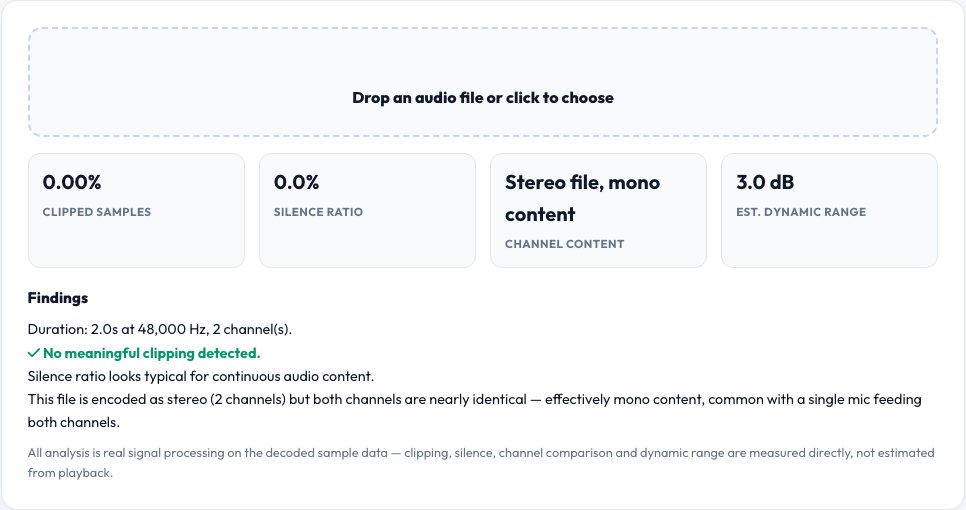
Upload an audio file (WAV, MP3 or most common formats your browser can decode).
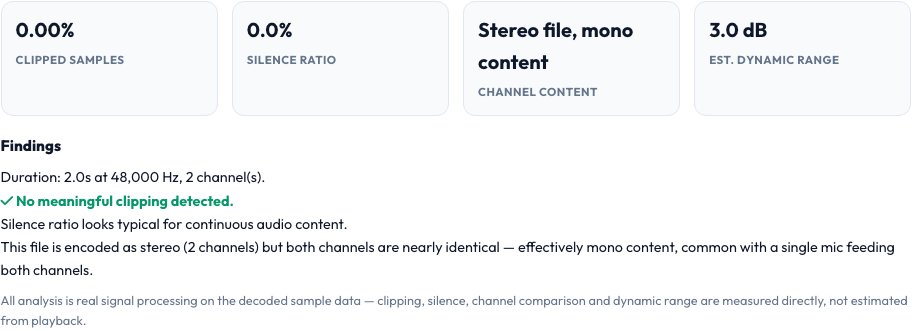 Download it
The tool decodes it and runs real DSP analysis on the actual samples.
Audio Recording Quality Checker
This tool decodes an uploaded audio file with the Web Audio API and runs real, deterministic digital-signal-processing checks directly on the actual sample data: it scans every sample for clipping (values pinned at or beyond ±1.0, meaning the recording level was too hot and permanently distorted), measures the proportion of the file that's effectively silent using a real RMS-based windowed analysis, checks whether the file is genuinely mono or stereo by comparing the two channels' actual sample data, and estimates dynamic range from the real peak-to-noise-floor ratio.
Every number reported comes from measuring the file's real decoded audio samples — not a text description or an AI estimate — so a podcaster, voice-over artist or musician can catch a bad recording (clipped, too quiet, silent gaps, or accidentally recorded in mono when stereo was intended) before publishing it.
Key features
Real clipping detection
Scans actual sample values for the telltale flat-topped waveform of digital clipping, with a percentage of affected samples.
Real silence-ratio analysis
Measures the real proportion of the recording that's effectively silent using windowed RMS, not a guess.
Genuine mono vs stereo check
Compares the left and right channel's actual sample data to detect if a 'stereo' file is really identical mono content duplicated.
Estimated dynamic range
Computes the real ratio between the loudest peaks and the quiet noise floor from the decoded samples.
How to use it
- Upload an audio file (WAV, MP3 or most common formats your browser can decode).
- The tool decodes it and runs real DSP analysis on the actual samples.
- Review the clipping percentage, silence ratio, mono/stereo status and estimated dynamic range.
- Fix flagged issues (re-record if clipped, trim silence, check stereo mic setup) before publishing.
Worked example
Example
A voice recording analyzed shows 2.3% of samples clipped (recording level was too hot in a few loud moments), 18% silence (natural pauses between sentences — normal), and confirmed genuine stereo channels — flagging the clipping as the one real issue worth fixing before publishing.
Who uses this tool
Podcasters and voice-over artists
Catch clipping or accidental mono recording before publishing an episode.
Musicians checking a mixdown or recording
Verify real dynamic range and confirm stereo content is genuinely stereo, not duplicated mono.
Anyone reviewing a recorded interview or meeting
Check for clipping or excessive silence before transcribing or publishing.
Tips for the best results
- Some clipping can happen briefly on a few loud words without being audibly objectionable — use the percentage as a signal to listen back to those moments, not an automatic fail.
- A high silence ratio isn't always a problem — natural pauses in speech are normal; it becomes worth investigating if it's unexpectedly high for the content type.
- A file showing 'mono content in a stereo file' isn't necessarily wrong — it just means both channels are identical, which is normal for some voice recordings but usually unintentional for music.
Common mistakes to avoid
- Ignoring a clipping percentage because the file 'sounds okay' on quick playback — clipped distortion can be subtle on small speakers and much more obvious on good headphones or speakers.
- Assuming a stereo-labeled file is really capturing stereo content without checking — many USB mic setups accidentally record identical mono content into both channels.
- Not checking dynamic range on a music mix, where an unexpectedly low range can indicate over-compression or over-limiting during mastering.
Why use AZRS QuickFix?
It is 100% free, needs no signup and has no watermark or usage limits. The tool runs in your browser, so what you type stays on your device, and it works on phones, tablets and desktops. New tools are added every week — bookmark this page or browse the full QuickFix toolbox.
Frequently asked questions
How is clipping actually detected?
The tool scans the real decoded sample data for values at or beyond the ±1.0 digital ceiling (the point where a sample can no longer represent the true waveform), and reports what percentage of samples hit that ceiling — this is a genuine measurement of the file's actual data, not a guess from playback.
How is silence measured?
By computing the real root-mean-square (RMS) energy in short windows across the whole file and counting what fraction of those windows fall below a low-energy threshold — a standard, real DSP approach to silence detection.
How does it tell mono from stereo?
By directly comparing the actual sample values of the left and right channels — if they're identical (or extremely close) throughout, the file is reported as effectively mono content even if it's technically encoded as a 2-channel file.
What is dynamic range here?
An estimate of the ratio between the loudest peak samples and the quiet noise-floor samples in the real decoded audio — a low dynamic range can indicate heavy compression/limiting, a very high range can indicate an inconsistent recording level.
Does this transcribe or identify the audio content?
No — this is pure signal analysis of the waveform data; it doesn't listen to or interpret what's being said.
Is my audio file uploaded anywhere?
No, it's decoded and analyzed entirely in your browser with the Web Audio API.