G-code Editor & Inspector — Insert Pauses, M600, Strip Comments
Insert filament changes, pauses, temperature/speed changes at a layer; strip & compress · free, no signup
See G-code Editor & Inspector — Insert Pauses, M600, Strip Comments in action
Free G-code Editor & Inspector
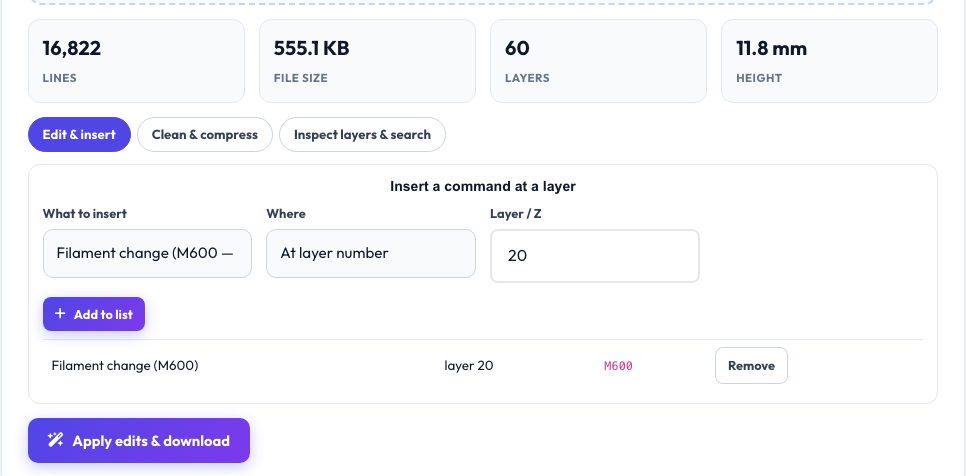
Sometimes you need to change a sliced file without re-slicing: swap filament at a layer for a colour change, pause to insert magnets, lower the temperature for a bridge-heavy section, or shrink a huge file for an SD card. This editor indexes every layer in your G-code (using the slicer's layer markers or Z changes), then lets you queue insertions at a layer number or height — M600 filament change, M0/M25/@pause/Klipper PAUSE, M104 temperature, M140 bed, M220 speed, M221 flow, M106 fan or any custom lines.
The clean-up tab strips comments (keeping slicer markers so viewers still work), removes display/progress commands, rounds coordinates to cut file size, adds a Z offset, scales all feed rates and prepends or appends your own start/end G-code. The inspector tab lists every layer with its line number and time, and has a search box and line jumper with context. The edited file is re-validated against the same parser, so layers stay intact.
Key features
Insert at layer or Z
Filament change, pauses, temperature, speed, flow, fan and custom G-code, queued and removable.
Strip & compress
Remove comments, round numbers, drop progress lines — files often shrink 20–40%.
Inspect layers
Layer table with line numbers and search with ±18-line context.
Safe edits
Insertions go before the slicer's layer-change marker so motion stays valid.
How to use it
- Drop in your .gcode file.
- Queue an insertion (e.g. M600 at layer 25) or choose clean-up options.
- Optionally check the layer in the Inspect tab.
- Press Apply & download.
Worked example
Example
To change colour at 3.0 mm on a 0.2 mm print: choose Filament change (M600), Where = Z (mm), value 3.0 → the tool inserts M600 right before the first layer at or above 3.0 mm (layer 15).
Who uses this tool
Multi-colour printers (single extruder)
Colour changes at exact layers.
Makers embedding hardware
Pause at the layer where the cavity closes.
Anyone with large G-code files
Compress to fit SD cards and speed up uploads.
Tips for the best results
- Check your firmware supports M600; Klipper needs a PAUSE/ M600 macro.
- Use the Z option when you do not know the layer number.
- Keep slicer markers when stripping comments so viewers can still show layers.
- Always check the first edit in the G-code viewer before a long print.
Common mistakes to avoid
- Inserting M600 in the middle of a layer instead of between layers.
- Rounding E values too aggressively on tiny layers.
- Applying a Z offset to a file that uses relative Z moves.
Why use AZRS QuickFix?
It is 100% free, needs no signup and has no watermark or usage limits. The tool runs in your browser, so what you type stays on your device, and it works on phones, tablets and desktops. New tools are added every week — bookmark this page or browse the full QuickFix toolbox.
Frequently asked questions
Where are commands inserted?
Immediately before the layer-change comment of the chosen layer (or before the first extruding move if no markers).
Does stripping comments break anything?
No, G-code comments are ignored by firmware; markers kept optionally for viewers.
Will the edited file be re-checked?
The layer indexer re-reads your file; open the result in the viewer to confirm.
Is it private?
Yes — the file stays in your browser.