PDF Permanent Redaction Tool
Permanently remove selected text and regions from a PDF by rebuilding it as a flattened image — not just a visual black box · free, no signup
See PDF Permanent Redaction Tool in action
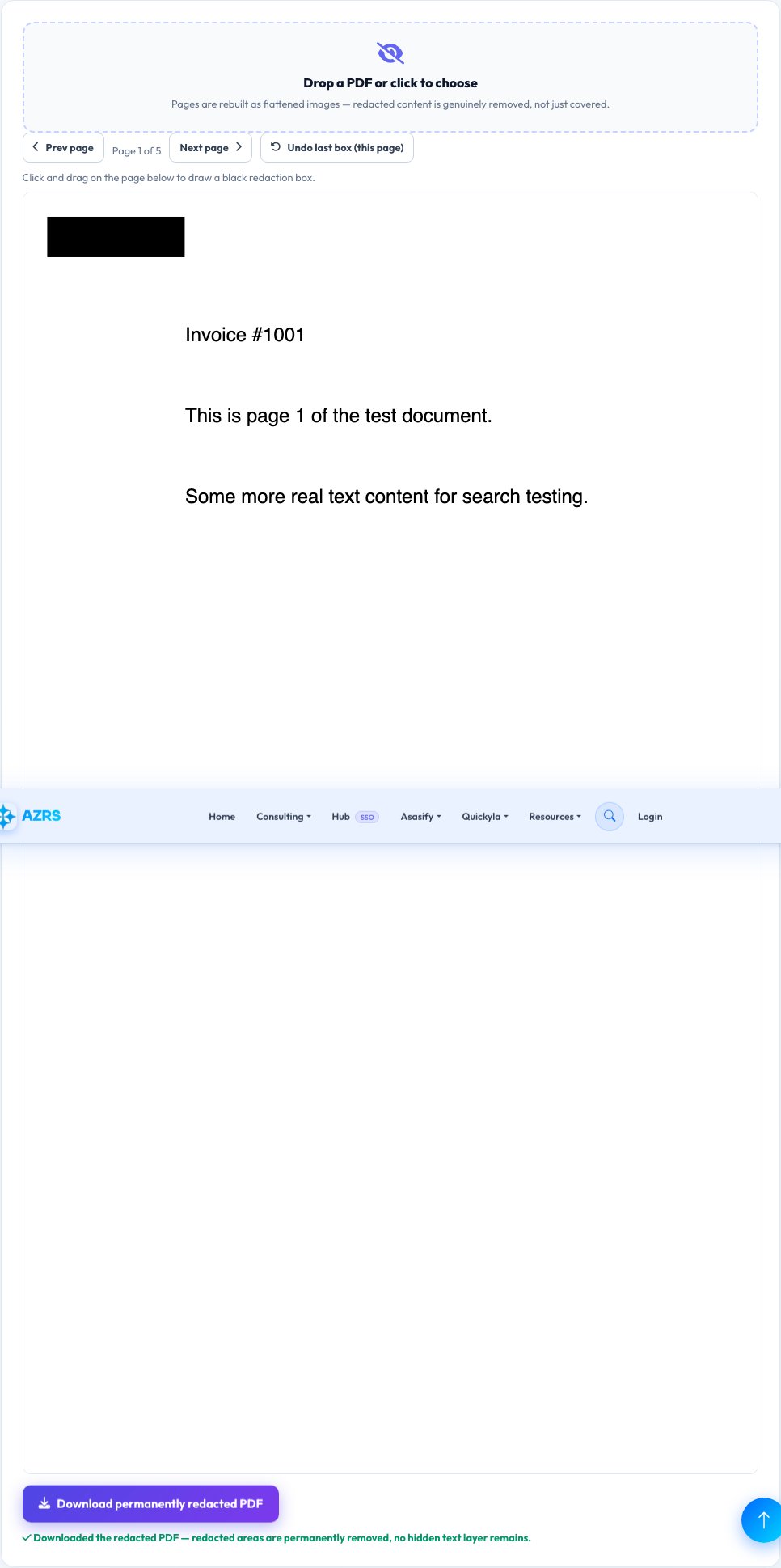
PDF Permanent Redaction Tool
A common, dangerous mistake is 'redacting' a PDF by drawing a black rectangle over sensitive text with a PDF editor — the original text is often still there underneath, extractable by copy-pasting, selecting, or opening the file in a different viewer. This tool avoids that trap entirely by taking a fundamentally different, genuinely permanent approach: it renders each page to a real raster image with pdf.js, lets you draw black redaction boxes over that image, and then rebuilds the entire PDF from those flattened images using pdf-lib.
Because the output PDF's pages are images, not the original vector/text content, there is no hidden text layer left underneath your redaction boxes to extract — the redacted information is genuinely gone from the file, not just visually covered, which is the real, defensible meaning of 'permanent redaction'.
Key features
Genuinely removes the underlying content
Rebuilds pages as flattened images, so there's no hidden text layer left to extract from underneath a black box.
Draw redaction boxes visually
Click and drag directly on each page's real rendered content to mark exactly what to black out.
Multi-page support
Navigate through every page of the document and add redaction boxes wherever needed.
Real before-you-download preview
See exactly how each redacted page will look before finalizing and downloading.
How to use it
- Upload the PDF you need to redact.
- Navigate to each page containing sensitive text or images.
- Draw a black box over every area to permanently remove.
- Download the rebuilt PDF — the redacted areas are gone from the underlying page content, not just covered.
Worked example
Example
A contract PDF with a client's Social Security number on page 3 has a black box drawn directly over those digits; the rebuilt, downloaded PDF has page 3 as a flattened image with that region permanently blacked out — there's no selectable text underneath to copy out, because the page is no longer text at all.
Who uses this tool
Anyone sharing a document that contains sensitive personal or financial information
Remove that information for real, not just visually, before sending the file onward.
Legal, HR and compliance staff preparing documents for disclosure
Produce a genuinely redacted document rather than risking a black-box-over-text mistake.
Anyone posting a document publicly that has some private details
Permanently strip out only the sensitive parts while keeping the rest of the document readable.
Tips for the best results
- Because the output is image-based, any text you did NOT redact is no longer selectable/searchable/copyable text either — this tool trades text-layer functionality for genuine redaction security; if you need to keep most text selectable, only use this on pages that actually contain sensitive content.
- Zoom in and review each redacted page carefully before downloading — once satisfied, the original PDF with the sensitive text should also be deleted or kept fully private, since only the newly downloaded file is redacted.
- Very long documents will produce a larger file since every page becomes an image — this tradeoff is the real cost of genuinely permanent redaction.
Common mistakes to avoid
- Using a different tool that only draws a visual black rectangle on top of the original text — that text is frequently still extractable underneath, which is a real, common data-leak mistake this tool is specifically built to avoid.
- Forgetting that redacted-page text is no longer selectable afterward, since real permanent redaction requires converting the page to a flattened image.
- Not deleting the original, un-redacted PDF after producing the redacted version — the sensitive content still exists in that original file.
Why use AZRS QuickFix?
It is 100% free, needs no signup and has no watermark or usage limits. The tool runs in your browser, so what you type stays on your device, and it works on phones, tablets and desktops. New tools are added every week — bookmark this page or browse the full QuickFix toolbox.
Frequently asked questions
Why is this more 'permanent' than drawing a black box in a normal PDF editor?
Because a black box drawn on top of a PDF's existing vector/text content typically leaves that original text intact underneath and extractable (by copy-paste, text search, or opening the raw file structure). This tool instead rebuilds each page as a flattened raster image with the redaction already baked in, so there's no hidden text layer left to extract — the content is genuinely gone from the file.
Will my document still have selectable text after redaction?
No — because the whole page becomes an image to guarantee real removal, none of that page's text remains selectable or searchable afterward. This is the real, necessary tradeoff for genuine permanent redaction.
Can I redact just part of a page and keep the rest editable?
The redacted page as a whole becomes a flattened image; if you need other pages to remain fully editable text, you can process only the specific pages that contain sensitive content.
Does this work on scanned PDFs too?
Yes — since it works by rendering each page to an image regardless of whether the original content was text or already a scan, it works the same way either way.
Is the PDF uploaded to a server?
No, both the rendering (pdf.js) and the rebuilding (pdf-lib) happen entirely in your browser; the file never leaves your device.
Is my data stored?
No, nothing is saved after you leave the page.