Printable Calendar & Planner Generator
Generate a printable monthly or yearly calendar for any month and year · free, no signup
See Printable Calendar & Planner Generator in action
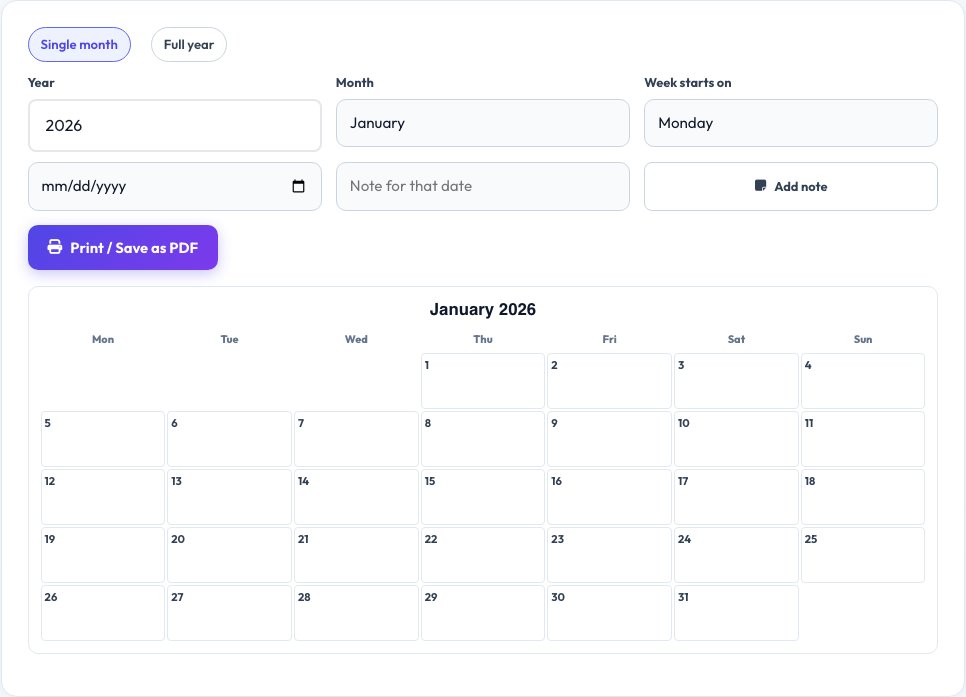
Free Printable Calendar & Planner Generator
Generate a clean, printable calendar for any month and year — pick a single month for a wall or desk calendar, or a full 12-month view for a yearly planner. Choose whether the week starts on Sunday or Monday, and add short notes to specific dates for birthdays, deadlines or reminders before printing.
The layout is designed to print cleanly with plenty of room to write in each day's box, and you can save it as a PDF straight from your browser's print dialog instead of printing on paper. It works for any year, past or future, so it also suits planning ahead or building a record of a specific month.
Key features
Any month or year
Not limited to the current calendar year.
Monthly or full-year view
A single month or all 12 months at once.
Custom notes
Add short text to any date before printing.
Print or save as PDF
Clean layout with space to write in each box.
How to use it
- Choose the month and year (or a full year).
- Pick the starting weekday.
- Add notes to any dates you want marked.
- Print or save as PDF.
Worked example
Example
June 2027, week starting Monday, note “Team offsite” on the 14th → a clean printable month grid with that note shown on the date.
Who uses this tool
Planners and organisers
Print a wall calendar with key dates marked.
Teachers and students
Print a blank calendar for assignments and academic planning.
Small businesses
Create a simple yearly planner for the team.
Tips for the best results
- Use the full-year view for a birthday or holiday reference sheet.
- Add notes for recurring events before printing rather than writing them by hand each time.
- Print in landscape orientation for the yearly view to fit all 12 months comfortably.
- Save as PDF if you want a digital copy as well as a printed one.
Common mistakes to avoid
- Forgetting to check the correct starting weekday for your country before printing many copies.
- Cramming too many notes onto a single small day box.
- Printing in portrait for the 12-month view, which can cramp the layout — use landscape.
Why use AZRS QuickFix?
It is 100% free, needs no signup and has no watermark or usage limits. The tool runs in your browser, so what you type stays on your device, and it works on phones, tablets and desktops. New tools are added every week — bookmark this page or browse the full QuickFix toolbox.
Frequently asked questions
Can I generate a calendar for a past year?
Yes, any month and year can be generated, not just the current one.
Can I add notes to specific days?
Yes, click a date and type a short note that appears in that day's box.
Does it start the week on Monday or Sunday?
You choose — both options are supported to match your country's convention.
Can I save it as a PDF instead of printing on paper?
Yes, choose 'Save as PDF' in your browser's print dialog instead of a physical printer.
Is there a yearly overview option?
Yes, switch to the full-year view for all 12 months on one printable layout.
Is my calendar data stored anywhere?
No, it is generated fresh in your browser and nothing is saved or sent to a server unless you choose to print or save the PDF yourself.