PayPal vs Stripe Fee Calculator
Compare real PayPal and Stripe payment processing fees side by side, plus reverse 'what to charge to net $X' · free, no signup
How PayPal vs Stripe Fee Calculator works, step by step
Enter a sale amount.
 Download it
See Stripe's and PayPal's real fees and your net payout on each, side by side.
PayPal vs Stripe Fee Calculator
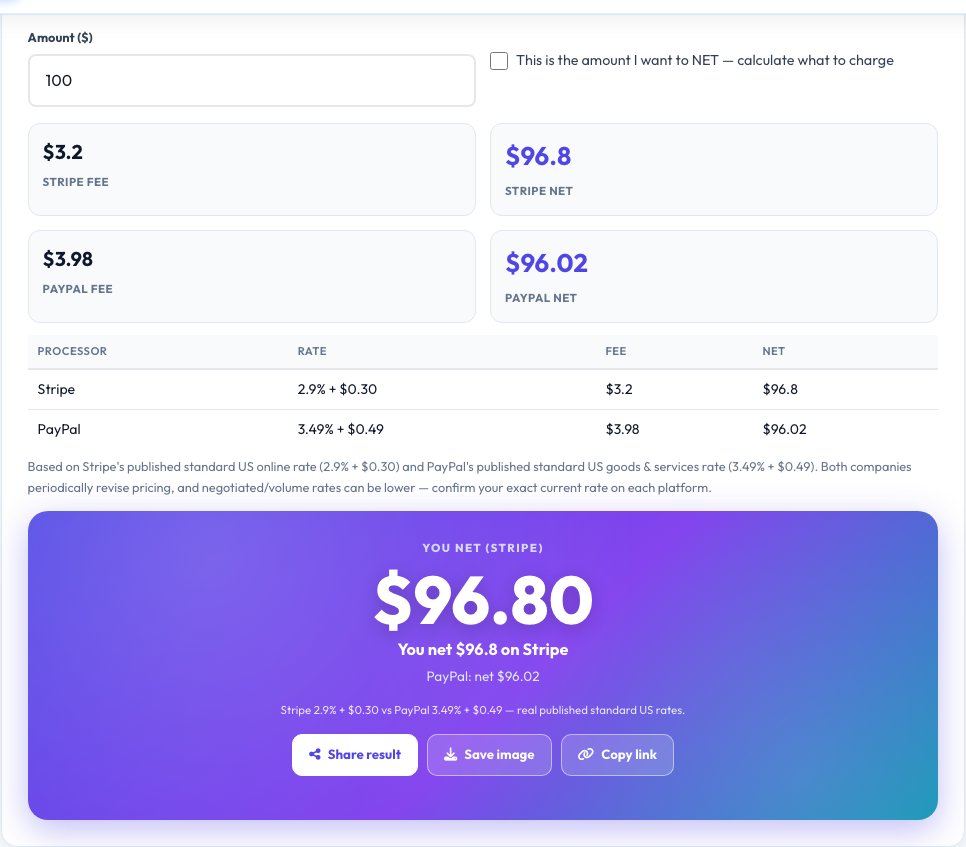
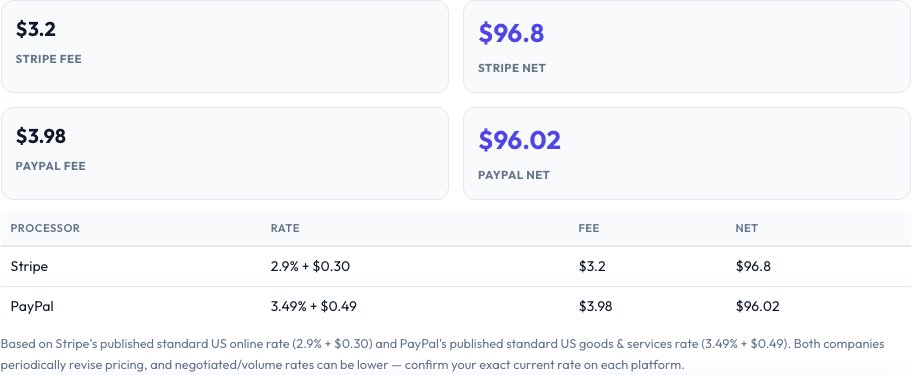
Enter a sale amount and this tool auto-computes the real fee both processors charge on it, using each platform's actual published standard US online rate: Stripe at 2.9% + $0.30 per transaction, and PayPal at 3.49% + $0.49 per transaction for goods & services. The two are shown side by side so you can see exactly how much more (or less) each one takes on your real numbers, not a rough guess.
Switch on 'reverse calculate' and enter the amount you actually want to net after fees instead — the tool solves the real algebra for you (gross = (net + fixed fee) / (1 - percentage rate)) to show exactly what price to charge on each processor so your target amount lands in your account.
Key features
Two real processors compared
Stripe's and PayPal's actual published standard US rates calculated side by side on the same amount.
Real fixed + percentage fee math
Applies each platform's real percentage AND fixed per-transaction fee, not just one or the other.
Reverse 'net to gross' mode
Enter the amount you want to net and get the exact price to charge, solved with real algebra.
No manual fee lookup
You never need to already know either platform's fee — just enter an amount.
How to use it
- Enter a sale amount.
- See Stripe's and PayPal's real fees and your net payout on each, side by side.
- Toggle 'reverse calculate' to instead enter your target net amount.
- See exactly what price to charge on each processor to net that amount.
Worked example
Example
$100 sale → Stripe fee $3.20 (2.9% + $0.30), you net $96.80; PayPal fee $3.98 (3.49% + $0.49), you net $96.02. Reverse: to net exactly $100 → charge $103.30 on Stripe or $104.12 on PayPal.
Who uses this tool
Freelancers and small businesses invoicing clients
Pick the processor that leaves more in your pocket, or price invoices to net a specific take-home amount.
Online sellers choosing a payment gateway
Compare the real fee gap before committing to one processor.
Anyone quoting a price that must net a round number
Use reverse mode instead of guessing and re-checking after the fact.
Tips for the best results
- PayPal's and Stripe's rates can vary for micropayments, international cards, currency conversion, or non-profit/volume-based custom pricing — this tool uses each platform's standard published US online rate.
- The reverse calculation's formula, gross = (net + fixed) / (1 − rate), is exact algebra for a single percentage-plus-fixed fee — verify it against your own numbers if the amounts are unusually large.
- Chargebacks, disputes and currency conversion fees are separate from the base processing fee shown here.
Common mistakes to avoid
- Assuming both processors charge the same rate — PayPal's standard goods & services rate is meaningfully higher than Stripe's standard online rate.
- Forgetting the fixed per-transaction fee ($0.30 or $0.49) on small sale amounts, where it's proportionally the biggest chunk of the fee.
- Using the standard rate when you actually have a negotiated volume rate, which would be lower than what's modeled here.
Why use AZRS QuickFix?
It is 100% free, needs no signup and has no watermark or usage limits. The tool runs in your browser, so what you type stays on your device, and it works on phones, tablets and desktops. New tools are added every week — bookmark this page or browse the full QuickFix toolbox.
Frequently asked questions
How much does Stripe really charge?
Stripe's published standard rate for US online card payments is 2.9% + $0.30 per successful transaction.
How much does PayPal really charge?
PayPal's published standard rate for US goods & services transactions is 3.49% + $0.49 per transaction, as of its most recent published rate change — higher than Stripe's standard online rate.
How does the reverse 'net to gross' calculation work?
Real algebra: gross = (target net + fixed fee) / (1 − percentage rate). This solves exactly what price makes the after-fee amount equal your target, rather than approximating by trial and error.
Do these rates ever change?
Yes — both companies periodically revise fees; this tool uses each platform's most recently published standard US rate, clearly labelled, and you should confirm current pricing on each platform for high-stakes decisions.
Is my data stored?
No, everything is calculated locally in your browser.