STL Boolean Tool (Union, Subtract, Intersect)
Merge, cut or intersect two 3D models, or drill holes with built-in primitives · free, no signup
See STL Boolean Tool (Union, Subtract, Intersect) in action
Free STL Boolean Tool — Union, Subtract & Intersect
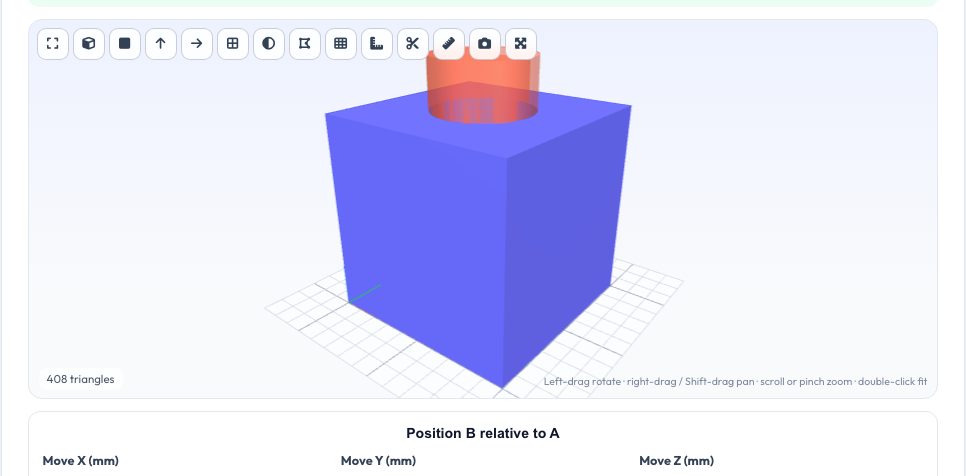
The most common fix for an STL you cannot edit in CAD is a boolean operation: drill a hole in it, cut a slot, merge a bracket onto it, or keep only the part where two shapes overlap. This tool performs union (A ∪ B), difference (A − B) and intersection (A ∩ B) on two closed meshes entirely in your browser. Load model A, then either load a second model B or add a built-in cylinder, box or sphere, move and rotate it into place with numeric fields, and see it as a translucent overlay before you commit.
The geometry runs in a background thread using constructive solid geometry, so the page stays responsive; the output is healed so edges are properly shared and the tool then reports triangles, volume, watertightness and the number of separate bodies. Boolean operations need closed inputs, so the tool warns when a body is not watertight and links to the repair tool, and it limits very dense models that would take too long — simplify them first.
Key features
Union, subtract, intersect
All three operations with a live translucent preview of the tool body.
Primitive tools
Cylinder, box and sphere for quick holes, slots and pockets.
Numeric placement
Move, rotate and scale B relative to A, or start from the centre or top face.
Result report
Triangles, volume, bodies and watertight check, then export STL/3MF/OBJ/PLY.
How to use it
- Drop in model A and then model B (or choose a primitive).
- Position B with the move/rotate/scale fields.
- Pick union, subtract or intersect and press Apply.
- Check the result and download it.
Worked example
Example
Subtracting a 10 mm cylinder (30 mm tall) centred on the top of a 40 mm cube leaves a cube with a through hole: the volume drops by π·5²·40 ≈ 3,142 mm³ and the result stays watertight.
Who uses this tool
Makers
Add mounting holes or merge parts without opening CAD.
Teachers
Demonstrate constructive solid geometry.
Anyone with a downloaded STL
Fix or modify a model that has no source file.
Tips for the best results
- Make B slightly longer than the cut so surfaces do not coincide.
- Repair non-watertight inputs first.
- Keep each model below about 30,000 triangles.
- Use 'B centred on A's top face' for drilling from above.
Common mistakes to avoid
- Booleaning two open/broken meshes and expecting a clean solid.
- Placing B exactly flush with a face, which can leave hairline slivers.
- Using millions of triangles — simplify first.
Why use AZRS QuickFix?
It is 100% free, needs no signup and has no watermark or usage limits. The tool runs in your browser, so what you type stays on your device, and it works on phones, tablets and desktops. New tools are added every week — bookmark this page or browse the full QuickFix toolbox.
Frequently asked questions
What input is required?
Closed (watertight) meshes; the tool warns otherwise.
Why is the result slow?
Large models need heavy computation; reduce the triangle count first.
Can I use more than two bodies?
Apply operations one after another; load the result as A again.
Is it private?
Yes — nothing is uploaded.