Barcode Generator
Create Code 128, EAN-13, UPC-A, EAN-8 and Code 39 barcodes as PNG or SVG · free, no signup
See Barcode Generator in action
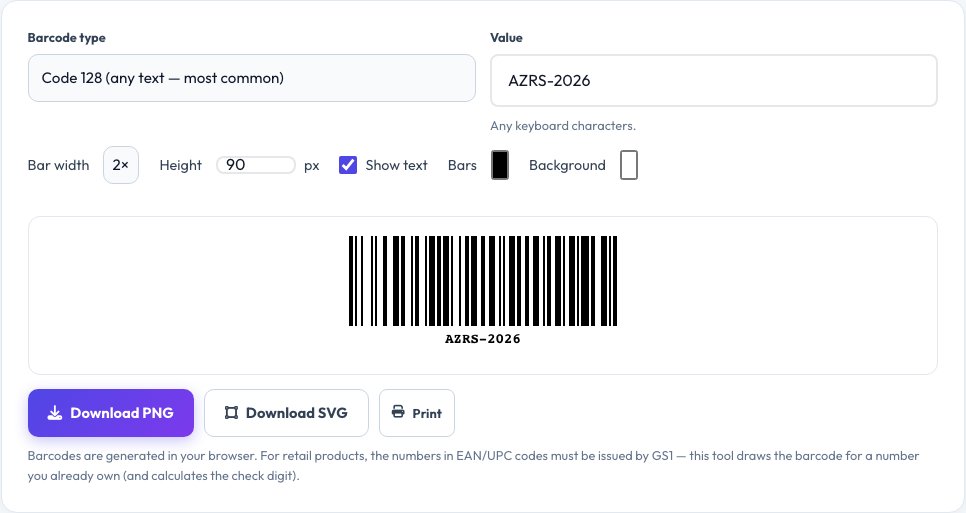
Free Barcode Generator — Code 128, EAN-13, UPC-A, EAN-8 and Code 39
Generate a scannable barcode for inventory labels, shelves, asset tags, tickets or products in seconds. Choose the type, enter the value, and the barcode is drawn instantly with the human-readable text underneath. For EAN-13, UPC-A and EAN-8 the tool calculates the check digit for you and validates it if you enter a full number.
Adjust the bar width, height and colours, then download a crisp PNG or a scalable SVG, or print it directly. Code 128 encodes any standard keyboard character and is the best all-round choice for internal use; EAN and UPC are the retail product formats. Everything is generated in your browser without uploading your data.
Key features
Five barcode types
Code 128, EAN-13, UPC-A, EAN-8 and Code 39.
Automatic check digits
Calculated and validated for EAN and UPC.
PNG, SVG and print
Raster for documents, vector for print shops.
Custom look
Bar width, height, colours and text on or off.
How to use it
- Choose the barcode type.
- Type or paste the value (numbers only for EAN/UPC).
- Adjust size and colours if you like.
- Download PNG or SVG, or print.
Worked example
Example
EAN-13 with 590123412345 → check digit 7 → 5901234123457.
Code 128 with AZRS-2026 → a compact barcode any scanner can read.
Who uses this tool
Shop owners and warehouses
Label products, shelves and boxes.
Small businesses and event teams
Make tickets, badges and asset tags.
Developers and students
Generate test barcodes and learn how they encode data.
Tips for the best results
- Leave a white margin (quiet zone) on both sides — scanners need it.
- Print at 300 dpi or more, and do not scale unevenly.
- Keep high contrast: dark bars on a light background.
- Test the printed barcode with a scanner or a phone app.
Common mistakes to avoid
- Inventing EAN or UPC numbers for retail products — official numbers come from GS1.
- Using coloured or low-contrast bars.
- Shrinking a barcode so far that the bars merge.
Why use AZRS QuickFix?
It is 100% free, needs no signup and has no watermark or usage limits. The tool runs in your browser, so what you type stays on your device, and it works on phones, tablets and desktops. New tools are added every week — bookmark this page or browse the full QuickFix toolbox.
Frequently asked questions
What is the difference between Code 128 and EAN-13?
Code 128 encodes any text and is flexible for internal use; EAN-13 encodes exactly 13 digits and is the global retail product standard.
What is a check digit?
The final digit, calculated from the others, that lets scanners catch misreads. The tool calculates it automatically.
Can I use these for selling in shops?
You need numbers issued by GS1 (or your reseller). This tool draws the barcode; it does not assign a product number.
Which format should I download?
PNG for documents and web; SVG when you need to scale for printing without losing sharpness.
Is my data uploaded?
No. Barcodes are drawn in your browser.
Why will my barcode not scan?
Check for a quiet zone, enough contrast, correct size and that the value is valid for the chosen type.