SSL Certificate Batch Checker
Check the real SSL/TLS certificate expiry, issuer and trust status of up to 20 domains at once, side by side · free, no signup
How SSL Certificate Batch Checker works, step by step
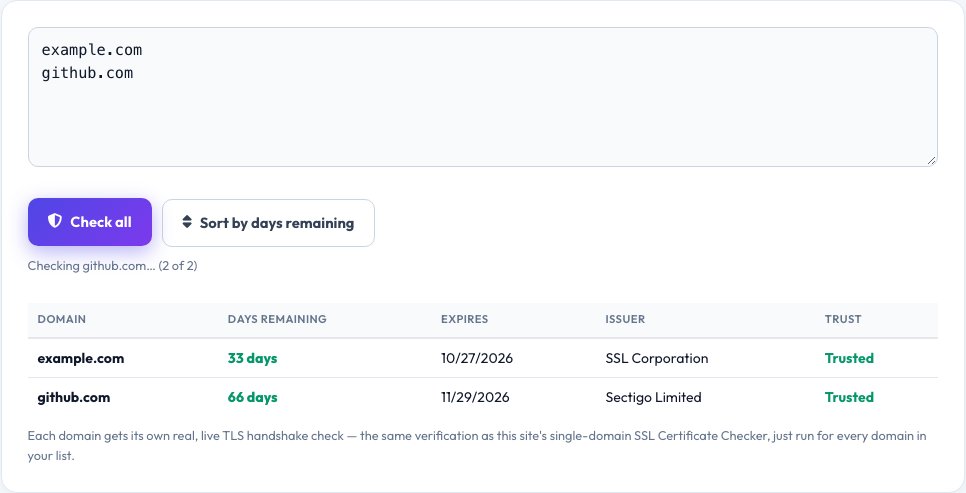
Paste your list of domains, one per line (up to 20).
 Download it
Click Check All.
SSL Certificate Batch Checker
This site's existing SSL Certificate Checker is built for one domain at a time. If you're responsible for a dozen sites, subdomains or client domains, checking each one individually is slow — this tool takes a full list, up to 20 domains at once, and runs the same real TLS handshake check against every one of them, then shows every result together in a single sortable table.
Each row shows that domain's real, live certificate expiry date, days remaining, issuer and trust status, exactly as a real browser would evaluate it — so you can spot at a glance which domains are fine, which are expiring soon, and which have already failed, across an entire portfolio of sites in one pass instead of one check at a time.
Key features
Real check per domain, not cached guesses
Every domain gets its own genuine, live TLS handshake check, the same real verification as the single-domain checker.
Up to 20 domains in one pass
Paste a whole list and get every result back together instead of checking one at a time.
Sortable by days-until-expiry
Instantly spot which domains are expiring soonest across your whole list.
Same real trust verification as the single checker
Reports genuine certificate trust status, not just whether a handshake technically completed.
How to use it
- Paste your list of domains, one per line (up to 20).
- Click Check All.
- Each domain is checked with a real, live TLS handshake, one at a time to stay within normal usage limits.
- Review the sortable results table — expiry date, days remaining, issuer and trust status for every domain.
Worked example
Example
A list of 8 client domains returns a table where 6 show a real, valid certificate with 60+ days remaining, one shows only 4 days remaining (flagged in red as urgent), and one fails the handshake entirely (flagged as an active problem) — an at-a-glance view no single-domain checker run eight separate times would show as clearly.
Who uses this tool
Agencies and freelancers managing several client websites
Check every client domain's certificate status in one pass instead of one at a time.
IT and DevOps staff monitoring internal services
Spot an expiring or broken certificate across many internal domains before it causes an outage.
Anyone auditing a list of domains before a migration or audit
Get a complete, real certificate-health snapshot across the whole list at once.
Tips for the best results
- Checks run one domain at a time in the background to respect normal fair-use request limits, so a full list of 20 domains takes a little longer than checking just one — this is expected, not a stall.
- A domain that fails the handshake entirely might be down, blocking automated checks, or have a genuinely broken certificate — the result distinguishes these where possible rather than reporting one generic failure.
- Re-run the check periodically (weekly or monthly) for domains you're responsible for, since certificate expiry dates don't change until renewed, but staying ahead of the expiry date requires checking again as time passes.
Common mistakes to avoid
- Waiting until a certificate has already expired to check — run this regularly enough that a 'days remaining' warning gives you time to renew before an outage.
- Pasting more than the supported number of domains and expecting them all to check instantly — respect the list size limit for reliable results.
- Assuming a failed check always means 'certificate expired' — it can also mean the domain is unreachable or misconfigured; read the specific reported reason for each failed row.
Why use AZRS QuickFix?
It is 100% free, needs no signup and has no watermark or usage limits. The tool runs in your browser, so what you type stays on your device, and it works on phones, tablets and desktops. New tools are added every week — bookmark this page or browse the full QuickFix toolbox.
Frequently asked questions
How is this different from the existing single SSL Certificate Checker?
That tool checks one domain per run, in depth. This tool is built specifically for checking many domains at once — paste up to 20 and get every domain's real, live certificate status back together in one sortable table, useful for anyone managing a portfolio of sites rather than a single one.
Is each domain's check real, or cached/simulated?
Real — every domain in the list gets its own genuine, live TLS handshake performed at the time you run the check, exactly like the single-domain checker does for one site.
What's the domain limit and why?
Up to 20 domains per run, to keep each batch check completing in a reasonable time and within normal fair-use request limits.
What does 'trust status' mean here?
Whether a real browser-style certificate chain validation against that domain would succeed — a certificate can technically exist and still fail trust validation (for example, if it's expired, self-signed, or doesn't match the domain).
Can I sort or export the results?
Results can be sorted by days-until-expiry to immediately surface the most urgent domains first.
Is my data stored?
No — the domain list and results exist only in your browser for that session.