Battery Status Checker
See your battery level, charging state and time remaining live in the browser · free, no signup
powercfg /batteryreport, on a Mac open System Settings → Battery. The Battery API works in Chrome, Edge and Opera; Safari and Firefox do not provide it.See Battery Status Checker in action
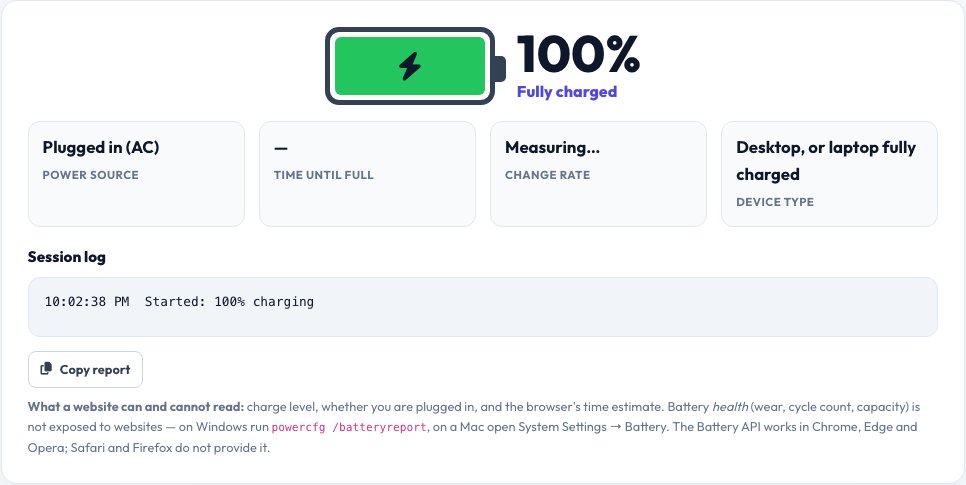
Battery Status Checker — Level, Charging and Time Remaining
See your device's battery at a glance in your browser: the current charge, whether it is running on battery or plugged in, and the operating system's estimate of the time to full charge or the time remaining. The battery icon changes colour as it drains, and a live change rate in percent per hour shows how quickly you are gaining or losing charge.
A session log records every change — charger connected, charger removed, each percent — so you can time a charge or see what drains the battery when you run a game or a video. The Battery API is available in Chrome, Edge and Opera on laptops, tablets and Android phones. Health data such as battery wear and cycle count is not exposed to websites; the page explains where to find it on your system.
Key features
Live level and status
Percentage, charging or discharging, plugged in or not.
Time estimates
Time to full or time remaining from the browser.
Change rate
Percent gained or lost per hour during this session.
Session log
A timestamped log you can copy.
How to use it
- Open the page in Chrome, Edge or Opera.
- Read the level, power source and time estimate.
- Plug or unplug the charger to watch it react.
- Copy the log if you want a record.
Worked example
Example
72% · Running on battery · 3 h 41 min left · −18.4 %/hour.\nCharger connected → “Charging — 48 min until full”.
Who uses this tool
Laptop and tablet owners
Time how long a charge lasts or how fast it charges.
Testers and reviewers
Log battery drain under different workloads.
Anyone troubleshooting power
Confirm a charger is really charging.
Tips for the best results
- Use a wired charger of the right wattage to charge faster.
- Test drain with a fixed workload (for example, a 1-hour video) for comparable numbers.
- For wear and health, use powercfg /batteryreport (Windows) or System Settings → Battery (Mac).
- Keep the tab open to collect a longer log.
Common mistakes to avoid
- Expecting health or cycle-count data — websites cannot read it.
- Trusting the time estimate during changing workloads.
- Testing in Safari or Firefox, which do not provide the Battery API.
Why use AZRS QuickFix?
It is 100% free, needs no signup and has no watermark or usage limits. The tool runs in your browser, so what you type stays on your device, and it works on phones, tablets and desktops. New tools are added every week — bookmark this page or browse the full QuickFix toolbox.
Frequently asked questions
Why does it say the Battery API is unavailable?
Safari and Firefox do not provide it. Use Chrome, Edge or Opera.
Can it show battery health?
No. Websites cannot read wear or cycle count. Use your operating system's battery report.
How accurate is the time remaining?
It is the operating system's estimate and changes with your workload.
Why does a desktop show 100% charging?
Desktops without a battery report a full, charging battery.
Is my data sent anywhere?
No. Readings stay in your browser.
Does it work on phones?
On Android with Chrome, yes. iPhones do not expose the Battery API to websites.