3D-Printable Box with Lid Generator
Parametric box and friction-fit lid STL with rounded corners and clearance · free, no signup
See 3D-Printable Box with Lid Generator in action
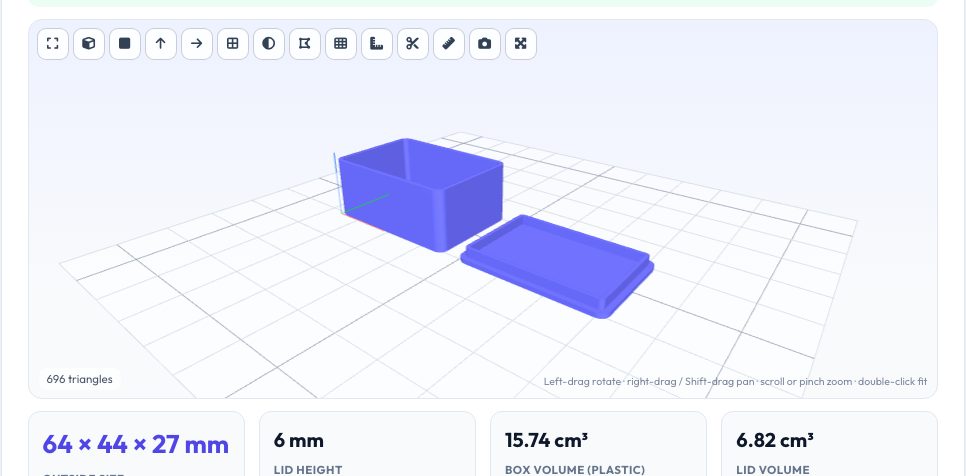
Free 3D-Printable Box with Lid Generator
Enter the inside width, depth and height you need — for a circuit board, a set of dice, a gift or a spare-parts tray — and this generator builds a rounded-corner box and a matching lid with an inner lip that holds it by friction. You set the wall, floor and lid thickness, the corner radius, the lip height and the fit clearance per side, and the tool shows the outside size, the volume of plastic, the filament needed and whether both parts are closed solids.
The box prints open side up and the lid prints plate-down with the lip upward, so both lie flat on the bed with no supports. Download the box and lid separately or together on one plate laid out side by side. Because everything is generated from your numbers, it is easy to iterate: print a quick test, adjust the clearance by 0.05 mm, and print again.
Key features
Exact inside size
Wall, floor and lid are added around your inside dimensions.
Friction-fit lip
Inner lip with adjustable clearance — no screws or hinges needed.
No supports
Both parts print flat; box open-up, lid plate-down.
Plate or single parts
Download both together or each on its own.
How to use it
- Enter the inside width, depth and height.
- Set wall, floor, lid, corner radius and clearance.
- Generate and check the outside size and the closed-solid check.
- Download the plate or individual parts and print.
Worked example
Example
A 60 × 40 × 25 mm inside box with 2 mm walls and floor, a 4 mm corner radius and a 4 mm lip is 64 × 44 × 27 mm outside; the usable capacity is 60 × 40 × 25 = 60 cm³ and the lid adds 6 mm of stack height (2 mm plate plus a 4 mm lip).
Who uses this tool
Makers
Quick custom enclosures and organisers.
Electronics hobbyists
Project boxes sized to the PCB.
Gift makers
Personalised gift and storage boxes.
Tips for the best results
- Start with 0.25 mm lip clearance; loosen to 0.3–0.35 mm on rough printers.
- Make walls a multiple of your nozzle width (e.g. 1.6, 2.0, 2.4 mm).
- Add 3–5 mm to the inside size for contents with tolerance.
- Print the lid first as a quick fit test.
Common mistakes to avoid
- Entering outside dimensions as inside dimensions.
- Making the corner radius larger than the wall allows.
- Forgetting that the lid adds 6–8 mm to the stack height.
Why use AZRS QuickFix?
It is 100% free, needs no signup and has no watermark or usage limits. The tool runs in your browser, so what you type stays on your device, and it works on phones, tablets and desktops. New tools are added every week — bookmark this page or browse the full QuickFix toolbox.
Frequently asked questions
Will the lid stay on?
Yes, by friction; adjust clearance for a tighter or looser fit.
Can I add a hinge or screws?
Not here; use the hinge tool or add holes in CAD.
Does it need supports?
No.
Is it free?
Yes — no watermark, no account.