Detect Any Website's Tech Stack Instantly
Competitor Intelligence Powered by 4-Layer Deep Analysis
Uncover exactly what CMS, framework, backend, CDN, analytics platform and plugins any website uses — in seconds. Confidence-scored results, no signup required.
Powerful Tech Detection Built for Competitor Intelligence
Everything you need to understand what your competitors are building on — and why it matters
CMS Detection
Instantly identify WordPress, Shopify, Drupal, Joomla, Wix, Squarespace, Webflow and 20+ other platforms with version detection.
Frontend Frameworks
Detect React, Vue, Angular, Next.js, Svelte, Nuxt.js, Gatsby and other modern JavaScript frameworks running on the site.
Backend Technologies
Discover server-side technologies including PHP, Node.js, Python/Django, Ruby on Rails, ASP.NET, and more from headers and patterns.
CDN & Hosting
Identify Cloudflare, Fastly, Akamai, AWS CloudFront, Vercel, Netlify and other CDN/hosting providers used for delivery.
Analytics & Marketing
Spot Google Analytics, Meta Pixel, HubSpot, Hotjar, Intercom and other marketing tools being used on any website.
Plugins & Libraries
Find jQuery, Bootstrap, Tailwind CSS, WooCommerce, Elementor and dozens more plugins with version numbers where possible.
Confidence Scoring
Every detected technology is scored 0–100% based on how many signals were found. No more guessing — know how certain each detection is.
4-Layer Deep Scan
Scans HTTP headers, HTML source, JavaScript/CSS patterns, and URL structure — not just a single layer like many competing tools.
Export Reports
Download full tech stack reports as JSON or CSV to share with your team, add to proposals, or track over time.
How Our Tech Stack Detector Works
Enter Any Website URL
Simply paste the URL of any website you want to analyze — your competitor, a prospect, or any site you're curious about.
4-Layer Deep Scan
Our engine fetches the URL and analyzes HTTP response headers, raw HTML source code, embedded JavaScript/CSS patterns, and URL path structures simultaneously.
Signal Aggregation & Scoring
Each detected pattern (called a signal) is matched against our database of 100+ technologies. Multiple signals for the same technology increase its confidence score.
Actionable Intelligence Report
Get a structured report showing every detected technology, its version (when available), confidence score, and which signals triggered the detection.
How to Use This Tool Effectively
Actionable SEO advice to get the most out of every analysis
Start With Your Competitors
Run your top 3 competitors through this tool first. Understanding their structure, keywords, and technical issues reveals exactly where you can outrank them.
Run Monthly Audits
SEO is not a one-time task. Schedule monthly checks to catch new issues before Google penalizes them. Consistent analysis beats one big yearly audit every time.
Fix High-Impact Issues First
Not all errors are equal. Prioritize: broken crawl paths → missing meta titles → slow load times → thin content. This order maximizes ranking gains per hour spent.
Internal Links Are Free PageRank
Every internal link passes authority between your pages. Use the Internal Link Finder to ensure your most important pages receive the most internal links.
Page Speed Directly Affects Rankings
Google's Core Web Vitals are a confirmed ranking factor. Pages loading under 2.5 seconds see significantly higher rankings and 40% lower bounce rates than slow pages.
Keep Your Sitemap Clean
Your sitemap tells Google what to index. Remove redirect chains, 404s, and noindex pages from it. A clean sitemap = faster, more complete indexation of good content.
More Free SEO Tools
Everything you need to dominate search rankings — all free, no signup required
🔍 SEO & Website Analysis
🧮 Free Calculators
⚙️ Developer & Utility Tools
See Tech Stack Detector — See Any Website's Technology in action
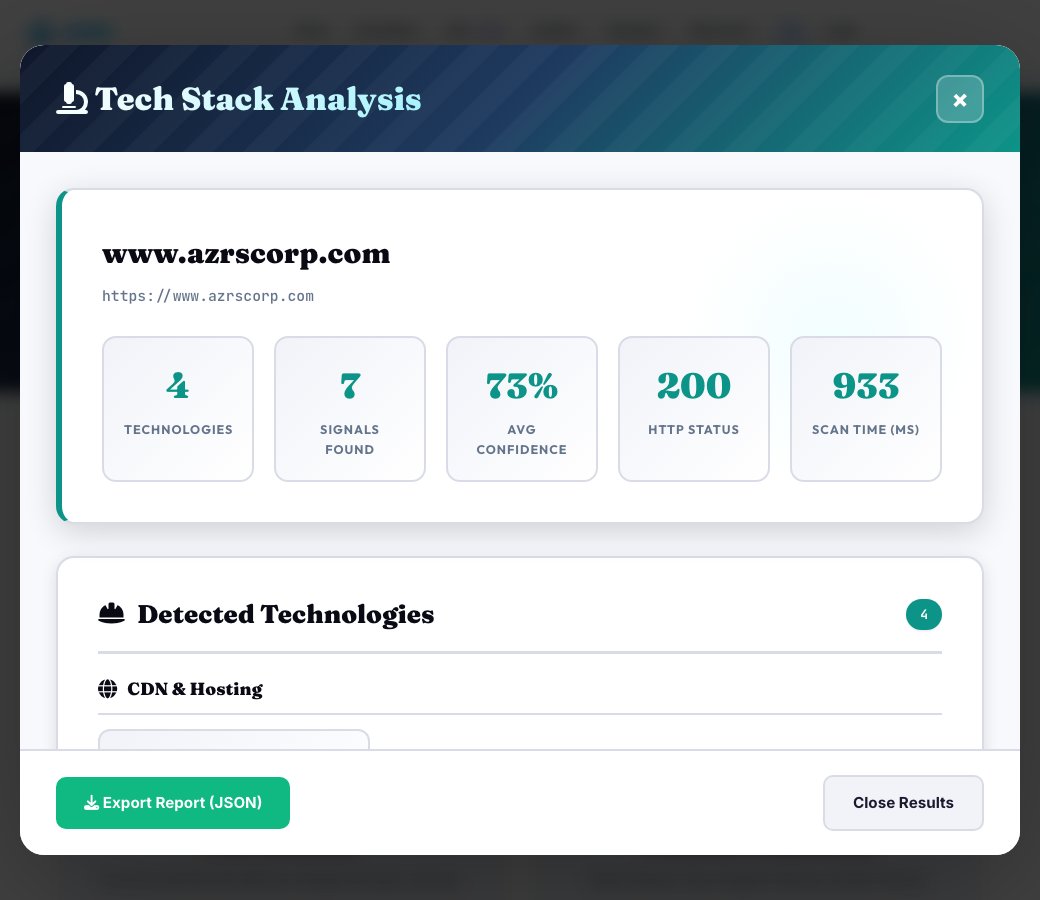
Tech Stack Detector — See Any Website's Technology
Enter any public URL and this tool fetches the live page and its response headers, then scans for real technology signals — CMS platform, JavaScript framework, backend language, CDN provider, analytics tools and common plugins — matching each against a signature database and returning a confidence score for every technology it detects.
This works the same general way tools like Wappalyzer do: matching known script paths, header values, HTML patterns and cookie names against a signature database, rather than guessing — free, with no browser extension or account required.
Key features
Multi-layer detection
Scans HTML, response headers and script patterns together for stronger, more accurate signals.
Confidence-scored results
Every detected technology comes with a confidence score, not just a flat yes/no guess.
Broad category coverage
Detects CMS, JS framework, backend language, CDN, analytics platform and plugins in one scan.
No account or extension needed
Runs entirely from a pasted URL — no signup, no browser install.
How to use it
- Enter the URL you want to analyze.
- Run the detection and let it fetch the page and headers live.
- Review each detected technology by category with its confidence score.
- Use the results to understand a competitor's stack or audit your own site's public-facing technology footprint.
Worked example
Example
Scanning a site detects WordPress as the CMS (high confidence via meta generator tag and wp-content paths), Cloudflare as the CDN (via response headers), and Google Analytics 4 (via the gtag script) — all in one pass.
Who uses this tool
Marketers researching competitors
See what CMS, analytics and marketing tools a competitor's site actually runs on.
Developers evaluating a potential vendor or partner site
Get a fast read on a site's technical stack before a partnership or integration conversation.
Agencies scoping new client work
Quickly understand what a prospective client's site is already built on before quoting a rebuild or migration.
Tips for the best results
- Check both the homepage and a couple of interior pages — some technologies (like a specific plugin) only load on certain page types.
- Treat low-confidence detections as a hint to verify manually (like viewing page source) rather than a certainty.
- Use CDN and analytics detections to understand a site's likely performance and tracking setup at a glance.
- Re-scan periodically when researching a competitor — tech stacks change during redesigns and migrations.
Common mistakes to avoid
- Treating every detected technology as 100% certain regardless of its confidence score.
- Only scanning the homepage when the technology you're looking for might only appear on product, blog or checkout pages.
- Assuming a low-traffic or JavaScript-heavy site will be fully detected from a single static HTML fetch — some client-rendered signals can be missed.
Why use AZRS QuickFix?
It is 100% free, needs no signup and has no watermark or usage limits. The tool runs in your browser, so what you type stays on your device, and it works on phones, tablets and desktops. New tools are added every week — bookmark this page or browse the full QuickFix toolbox.
Frequently asked questions
Is this similar to Wappalyzer?
Yes — it detects technology using the same general approach (matching HTML, header and script signatures against a database), and it's completely free with no account or browser extension required.
What categories of technology does it detect?
CMS platform, JavaScript framework, backend language, CDN provider, analytics tools and common plugins, each with its own confidence score.
Can I check competitor websites?
Yes — enter any public website URL to see what technologies power its infrastructure and marketing stack.
How accurate is the confidence score?
It reflects how many distinct signals (headers, HTML patterns, script paths) matched a technology's signature — more matching signals mean higher confidence, but it's still an inference, not a guarantee.
Does it work on password-protected or staging sites?
No — it can only analyze what's publicly reachable at the URL you enter, the same as any visitor's browser would see.
Is this free?
Yes, completely free with no signup required.