Regex Tester with Live Match Highlighting
Test regular expressions with live highlighted matches and capture groups · free, no signup
See Regex Tester with Live Match Highlighting in action
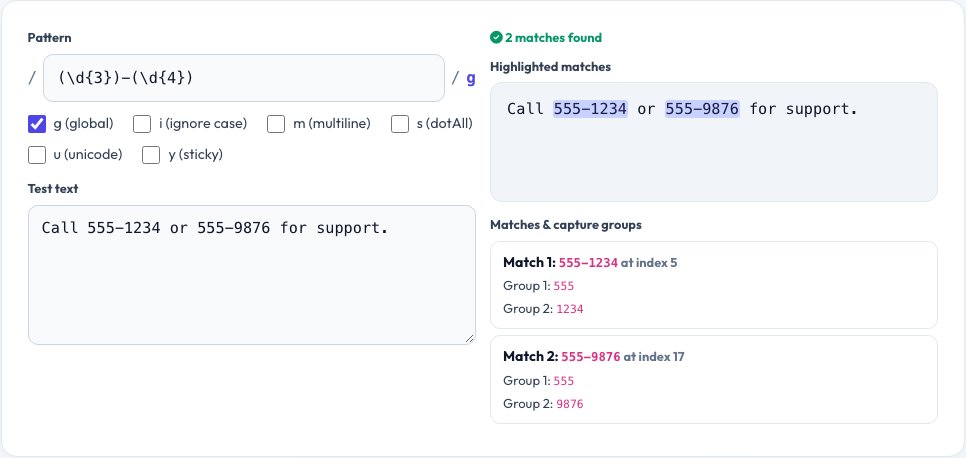
Free Regex Tester with Live Match Highlighting
Regular expressions are powerful but hard to get right by reading alone — a quantifier in the wrong place or an unescaped character can silently change what matches. This tester uses your browser's native JavaScript regex engine: type a pattern and a block of test text, and every match is highlighted directly in the text as you type, with no submit button and no server round-trip.
Below the highlighted text, each match is listed with its position and any capture groups it produced, which is the detail that is hardest to reason about by eye. Toggle the common flags — global (g), case-insensitive (i), multiline (m), dotAll (s) and unicode (u) — and see the match list update instantly, and a plain-English summary explains what your pattern element does part-by-part.
Key features
Live highlighting
Matches are highlighted in the test text as you type the pattern.
Capture group inspector
See each numbered and named group's captured value per match.
All standard JS flags
g, i, m, s, u and y, toggled with one click each.
No server round-trip
Uses your browser's native regex engine — instant and private.
How to use it
- Type your regular expression in the pattern box (without slashes).
- Paste or type your test text below it.
- Toggle flags like global or case-insensitive as needed.
- Read the highlighted matches and the capture-group list below.
Worked example
Example
Pattern: (\d{3})-(\d{4})
Flags: g
Text: "Call 555-1234 or 555-9876"
Matches: 555-1234 (group 1: 555, group 2: 1234), 555-9876 (group 1: 555, group 2: 9876)Who uses this tool
Developers
Debug a regex before dropping it into production code.
Data analysts
Test a pattern for extracting fields from log files or CSVs.
Students learning regex
See immediately how each pattern element changes what matches.
Tips for the best results
- Start simple and add complexity one piece at a time, checking matches after each change.
- Use non-capturing groups (?:...) when you need grouping but not a captured value, to keep the group list clean.
- Remember that . does not match newlines unless the s (dotAll) flag is on.
- Escape special characters like . ( ) [ ] with a backslash when you want them literally.
Common mistakes to avoid
- Forgetting the global flag, which causes only the first match to be found instead of all of them.
- Using greedy quantifiers (.*) when a lazy one (.*?) is needed, causing a match to span far more text than intended.
- Not anchoring a pattern with ^ and $ when the intent is to match the whole string, not just part of it.
Why use AZRS QuickFix?
It is 100% free, needs no signup and has no watermark or usage limits. The tool runs in your browser, so what you type stays on your device, and it works on phones, tablets and desktops. New tools are added every week — bookmark this page or browse the full QuickFix toolbox.
Frequently asked questions
Which regex flavour does this use?
Your browser's native JavaScript regex engine (ECMAScript), which is very close to what Node.js and most browsers use in production code.
Why isn't my pattern matching anything?
Check that special characters are escaped, that you have the right flags (especially case-insensitive for mixed-case text), and that anchors like ^ or $ aren't restricting the match unintentionally.
Can I see named capture groups?
Yes, groups defined with (?<name>...) are listed by name alongside numbered groups.
Does it support lookahead and lookbehind?
Yes, both are supported since they are standard JavaScript regex features.
Is my test text sent anywhere?
No, matching happens entirely in your browser; nothing is uploaded.
Can I test multiline text?
Yes, toggle the multiline (m) flag so ^ and $ match the start and end of each line rather than the whole string.