ZIP Creator & Extractor
Create ZIP files or open and extract them right in your browser · free, no signup
| File | Size | |
|---|---|---|
| No files added yet. | ||
See ZIP Creator & Extractor in action
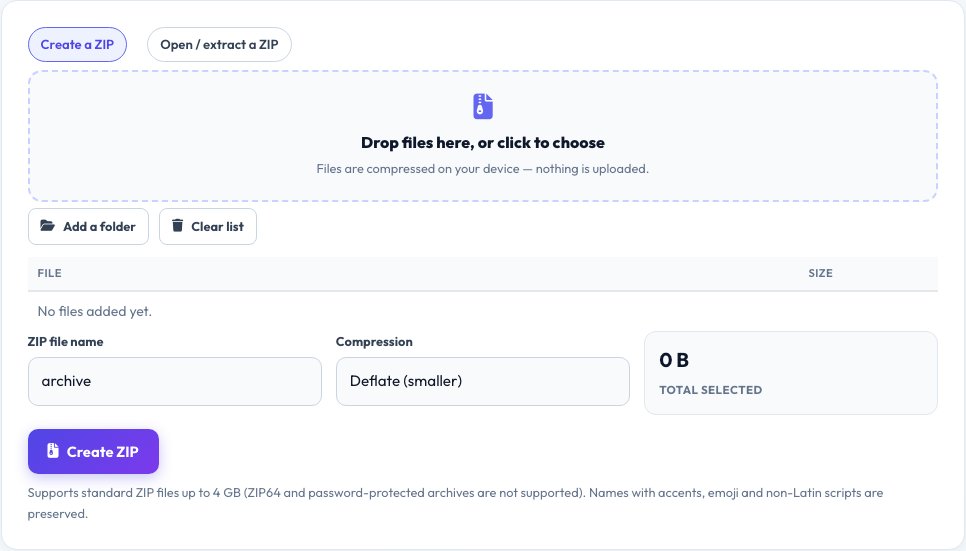
ZIP Creator and Extractor — Zip and Unzip Files in Your Browser
Bundle several files into a single ZIP, or open a ZIP someone sent you, without installing anything and without uploading a byte. To create an archive, drop in files or a whole folder, choose Deflate compression (or Store for speed), name it and download a standard .zip that opens on Windows, macOS, Linux, iOS and Android.
To read an archive, drop the .zip on the Open tab: you see every file and folder with its size, packed size, date and the overall space saved, and you can download any single file, each one verified with its CRC-32 checksum. File names with accents, emoji and non-Latin scripts are preserved. Password-protected and ZIP64 (over 4 GB) archives are not supported.
Key features
Real compression
Deflate via the browser's native compressor, or Store.
Folders and Unicode
Keeps folder structure and non-English names.
Browse and extract
See sizes and dates, download any file.
CRC verification
Detects damaged archives.
How to use it
- Choose Create a ZIP, add files or a folder, and click Create ZIP.
- Or choose Open / extract, and drop a .zip file.
- Browse the contents and download the files you need.
- Check the CRC confirmation for each extracted file.
Worked example
Example
12 files, 48 MB → archive.zip 21 MB (56% smaller). Opening it lists all 12 with sizes and dates.
Who uses this tool
Anyone sharing files
Bundle documents and photos into one download.
Students and office users
Open ZIPs without extra software.
Developers
Inspect an archive quickly.
Tips for the best results
- Photos and videos are already compressed, so ZIP saves little on them.
- Use Store for huge files you only want to bundle.
- Keep folder structure by using Add a folder.
- For very large archives, use desktop software.
Common mistakes to avoid
- Expecting password protection — this tool does not encrypt.
- Compressing files that are already compressed and expecting big savings.
- Opening ZIP64 archives over 4 GB here.
Why use AZRS QuickFix?
It is 100% free, needs no signup and has no watermark or usage limits. The tool runs in your browser, so what you type stays on your device, and it works on phones, tablets and desktops. New tools are added every week — bookmark this page or browse the full QuickFix toolbox.
Frequently asked questions
Are my files uploaded?
No. They are compressed and extracted in your browser.
Will the ZIP open on my computer?
Yes. It is a standard ZIP file that works on every major system.
Does it support password-protected ZIPs?
No. Encrypted archives cannot be opened or created here.
What is the size limit?
Creating is limited to about 1.5 GB; opening supports standard ZIP files up to 4 GB.
Are file names with accents and emoji kept?
Yes, names are stored as UTF-8.
What is the CRC check?
A checksum stored in the ZIP. If it does not match after extraction, the file is damaged.