Composite Section Moment of Inertia Calculator (Centroid, Ix, Iy, Section Modulus)
Centroid, moment of inertia and section modulus of any shape built from rectangles, circles, triangles, semicircles and holes · free, no signup
Shapes (positions are the centre of each shape's bounding box, in mm; y up)
See Composite Section Moment of Inertia Calculator (Centroid, Ix, Iy, Section Modulus) in action
Free Composite Section Moment of Inertia Calculator
Real cross-sections are rarely a single standard shape. This calculator lets you build one from simple pieces — rectangles, circles, ellipses, isosceles and right triangles and semicircles, any of which can be a hole — place each piece by the coordinates of its bounding-box centre, rotate it in 90° steps, and get the properties of the whole section: area, centroid, centroidal moments of inertia Ix and Iy, the product of inertia, the polar moment, principal moments and angle, section moduli at the extreme fibres and radii of gyration. A live drawing shows the shapes, holes in dashed red, and the centroid with its axes.
Each piece's own centroidal inertia is transferred to the combined centroid with the parallel-axis theorem and holes are subtracted. Examples load a T-section, an I-beam, a round tube, a rectangle with a semicircular cap and an L-section with a hole. Results were verified against closed-form solutions: circle πd⁴/64, semicircle (π/8 − 8/9π)r⁴ about its centroid and a T-section by parallel axis.
Key features
Many shape types
Rectangle, circle, ellipse, triangles, semicircle — add holes by ticking Hole.
Complete properties
A, centroid, Ix, Iy, Ixy, J, principal axes, S and r.
Live drawing
See your section with the centroid and axes.
Examples
T, I, tube, rectangle with cap, L with hole.
How to use it
- Add shapes and enter their size and bounding-box centre.
- Tick Hole for cut-outs and rotate as needed.
- Read the section properties.
- Compare with the drawing to check the layout.
Worked example
Example
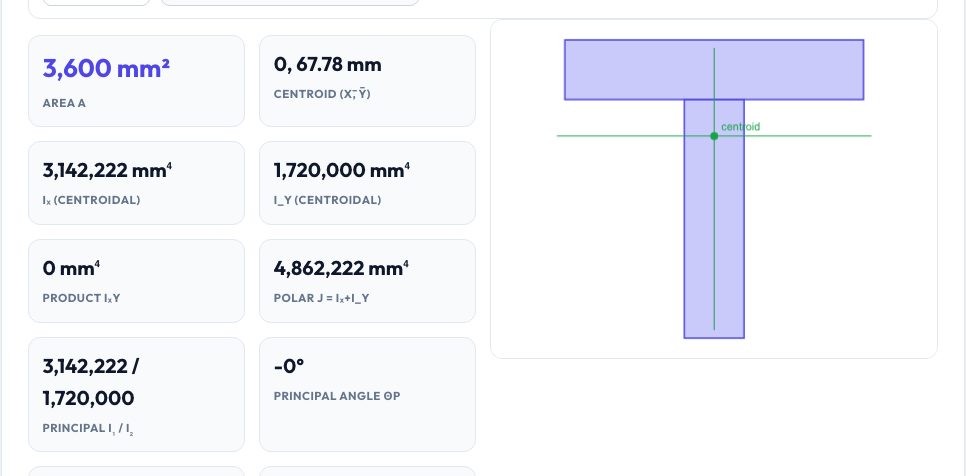
A T-section built from a 100 × 20 mm flange on top of a 20 × 80 mm web has an area of 3,600 mm², a centroid 67.8 mm above the bottom and Ix of about 3.14 × 10⁶ mm⁴.
Who uses this tool
Structural and mechanical students
Check centroid and inertia homework.
Designers
Custom extrusions and 3D-printed beams.
Engineers
Quick section properties for bending checks.
Tips for the best results
- Give positions as the centre of each shape's bounding box.
- Use holes instead of subtracting by hand.
- Check that the drawing matches your intent before trusting numbers.
- Use the section modulus S = I/c for stress: σ = M/S.
Common mistakes to avoid
- Entering the corner position instead of the centre.
- Forgetting to mark a cut-out as a hole.
- Using Iy when you need Ix — Ix is about the horizontal axis.
Why use AZRS QuickFix?
It is 100% free, needs no signup and has no watermark or usage limits. The tool runs in your browser, so what you type stays on your device, and it works on phones, tablets and desktops. New tools are added every week — bookmark this page or browse the full QuickFix toolbox.
Frequently asked questions
What is Ixy?
The product of inertia; zero for sections symmetric about an axis.
Can I draw any shape?
Any combination of the supported primitives, with holes.
What are principal axes?
The orientation where Ixy = 0 and inertia is maximum/minimum.
Is it free?
Yes.