
Explore the Reinforced Concrete Beam Designer
Pick a beam's width, depth, concrete and steel strengths and rebar, and watch the moment capacity and the ductile/brittle reinforcement check update live.
- Free to use
- No signup
- Nothing to install
- Runs in your browser
Illustration. Open the tool for the real thing.
See it in action
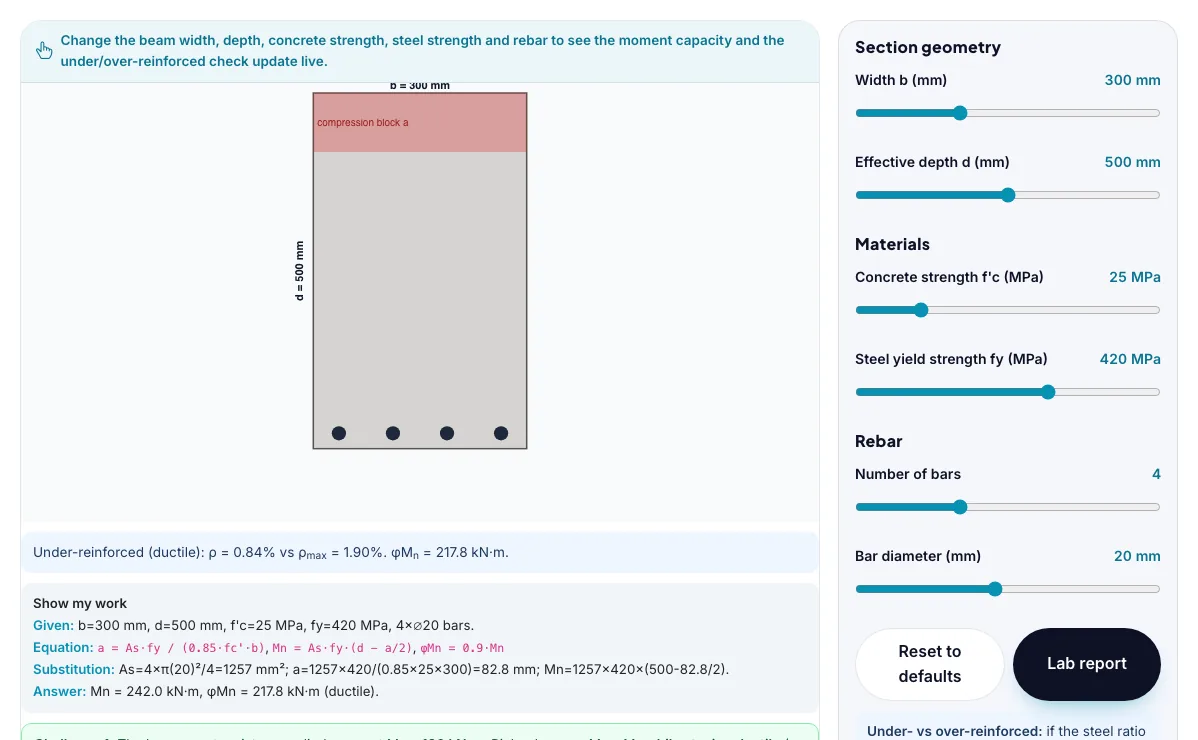
The Reinforced Concrete Beam Designer with sample data entered and the result showing.
What is the Reinforced Concrete Beam Designer?
Pick a beam's width, depth, concrete and steel strengths and rebar, and watch the moment capacity and the ductile/brittle reinforcement check update live. It runs in your browser, so a change to a setting or a drag on an object shows up at once.
Structural engineers run exactly this under/over-reinforced moment-capacity check on every reinforced concrete beam in buildings, bridges and parking structures before construction drawings are approved.
3 steps to your result
Open the tool and follow along. Nothing to install.
What you get
A singly-reinforced concrete beam's design moment capacity is phi*Mn = 0.9*As*fy*(d - a/2), where a = As*fy/(0.85*f'c*b) is the depth of the rectangular (Whitney) compression stress block.
The reinforcement ratio rho = As/(b*d) compares how much steel is used to the section size; a maximum ratio rho_max keeps the beam 'under-reinforced' so the steel yields first.
An under-reinforced beam fails ductile: the steel yields, cracks widen and it deflects visibly before ultimate failure - giving warning. An over-reinforced beam fails brittle: the concrete crushes suddenly with little warning.
Increase the effective depth and watch the design moment climb faster than adding steel does.
Add bars until the beam becomes over-reinforced and watch the failure-mode warning appear.
Try the 180 kN·m ductile-design challenge.
Used for
Pick one to see how it fits.
Engineering learners
Engineering and technology students, makers, robotics clubs and teachers of design and technology.
Try it freeTeachers
For teachers: project the Reinforced Concrete Beam Designer on the board, let students predict the result, then run it together and test this: Add bars until the beam becomes over-reinforced and watch the failure-mode warning appear. For students: change one thing at a time and write down what changes.
Try it freeHow it compares
A plain look at this tool next to the usual alternative.
| This simulation | Textbook diagram | |
|---|---|---|
| Interactive | Drag, tap and change settings | Fixed picture |
| Install | Nothing to install | Not needed |
| Cost | Free to use | Depends on the book |
Questions people ask
Why do building codes require beams to be under-reinforced rather than over-reinforced?
An under-reinforced beam's steel yields before the concrete crushes, which produces visible cracking and deflection that warns of impending failure and allows a ductile, gradual collapse; an over-reinforced beam's concrete crushes first, causing a sudden brittle failure with little or no warning, which codes intentionally design against.
Why does adding more rebar not always increase a beam's usable moment capacity as much as expected?
More steel area As increases the compression block depth a = As*fy/(0.85*f'c*b) as well as the tension force, and once a grows enough to push the reinforcement ratio rho past rho_max, the beam becomes over-reinforced and its failure mode switches from ductile steel yielding to brittle concrete crushing, which codes forbid regardless of the nominal moment number.
Is the Reinforced Concrete Beam Designer free to use?
Yes. The Reinforced Concrete Beam Designer is free, needs no signup or download and runs in your web browser. It is part of the Engineering group of AZRS simulations.
Does the Reinforced Concrete Beam Designer work on a phone or tablet?
Yes. The Reinforced Concrete Beam Designer takes touch input as well as mouse input, so you can use its 6 adjustable settings with a finger. A larger screen makes the controls and graphs easier to read.
How do I use the Reinforced Concrete Beam Designer?
1. In the Reinforced Concrete Beam Designer, use the controls to change Width b (mm), Effective depth d (mm), Concrete strength f'c (MPa), Steel yield strength fy (MPa), Number of bars, and more. The simulation reacts instantly. 2. Start with this experiment: Increase the effective depth and watch the design moment climb faster than adding steel does. Drag any glowing handle, object or slider with your mouse or finger and the Reinforced Concrete Beam Designer responds in real time. 3. Change one setting at a time and watch which readout moves, then compare it with this idea: A singly-reinforced concrete beam's design moment capacity is phi*Mn = 0.9*As*fy*(d - a/2), where a = As*fy/(0.85*f'c*b) is the depth of the rectangular (Whitney) compression stress block.
More free tools
Related to the Reinforced Concrete Beam Designer.
Try the Reinforced Concrete Beam Designer now
Pick a beam's width, depth, concrete and steel strengths and rebar, and watch the moment. Free to use.
Try it free