
Explore the Human Musculoskeletal Movement Simulator
Pick a joint, activate a muscle, and watch it flex the joint against a load - with live torque, mechanical advantage. Works on phones and computers.
- Free to use
- No signup
- Nothing to install
- Runs in your browser
Illustration. Open the tool for the real thing.
See it in action
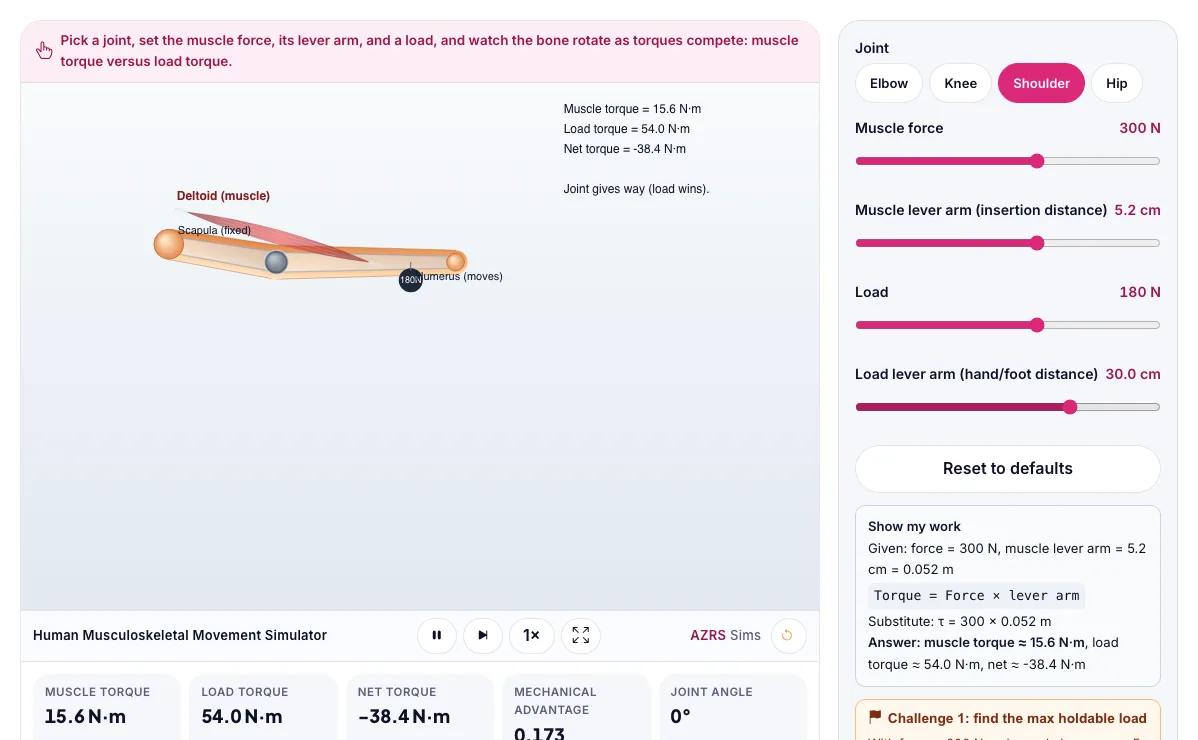
The Human Musculoskeletal Movement Simulator with sample data entered and the result showing.
What is the Human Musculoskeletal Movement Simulator?
Pick a joint, activate a muscle, and watch it flex the joint against a load - with live torque, mechanical advantage and a real load-versus-force experiment. It runs in your browser, so a change to a setting or a drag on an object shows up at once.
Physical therapists and biomechanists use exactly this torque model to explain why holding a weight at arm's length is so much harder than holding it close to the body.
3 steps to your result
Open the tool and follow along. Nothing to install.
What you get
Torque = force × lever arm (the perpendicular distance from the joint to where the force acts).
A joint moves when the muscle's torque is bigger than the load's torque, and holds still when they are equal.
Mechanical advantage = muscle lever arm ÷ load lever arm; most human joints have a mechanical advantage below 1, trading force for speed and range of motion.
Switch between the elbow, knee, shoulder and hip and compare their default lever arms.
Increase the load lever arm (hold the weight farther from the joint) and watch net torque flip negative.
Solve the challenge: find the exact load that balances a 300 N muscle force at a 5 cm lever arm.
Used for
Pick one to see how it fits.
Biology learners
Biology students and teachers who want to explore living systems, populations and genetics interactively and safely.
Try it freeTeachers
For teachers: project the Human Musculoskeletal Movement Simulator on the board, let students predict the result, then run it together and test this: Increase the load lever arm (hold the weight farther from the joint) and watch net torque flip negative. For students: change one thing at a time and write down what changes.
Try it freeHow it compares
A plain look at this tool next to the usual alternative.
| This simulation | Textbook diagram | |
|---|---|---|
| Interactive | Drag, tap and change settings | Fixed picture |
| Install | Nothing to install | Not needed |
| Cost | Free to use | Depends on the book |
Questions people ask
Why can weightlifters lift heavy loads even though their muscle's lever arm is short?
Muscles generate very large forces, and even a small lever arm still produces enough torque - though it means most of the muscle's force is 'wasted' on the joint rather than the load.
What does mechanical advantage less than 1 mean for a joint?
The muscle must pull with more force than the load weighs, but in exchange the hand or foot moves farther and faster than the muscle shortens.
Is the Human Musculoskeletal Movement Simulator free to use?
Yes. The Human Musculoskeletal Movement Simulator is free, needs no signup or download and runs in your web browser. It is part of the Biology group of AZRS simulations.
Does the Human Musculoskeletal Movement Simulator work on a phone or tablet?
Yes. The Human Musculoskeletal Movement Simulator takes touch input as well as mouse input, so you can use its 5 adjustable settings with a finger. A larger screen makes the controls and graphs easier to read.
How do I use the Human Musculoskeletal Movement Simulator?
1. In the Human Musculoskeletal Movement Simulator, use the controls to change Joint, Muscle force, Muscle lever arm (insertion distance), Load, Load lever arm (hand/foot distance). The simulation reacts instantly. 2. In the Human Musculoskeletal Movement Simulator, pick an option such as Elbow, Knee, Shoulder, Hip to switch modes or load an example. 3. In the Human Musculoskeletal Movement Simulator, press "Check equilibrium", "Check mechanical advantage" to start, reset or change what is happening. 4. Start with this experiment: Switch between the elbow, knee, shoulder and hip and compare their default lever arms. Drag any glowing handle, object or slider with your mouse or finger and the Human Musculoskeletal Movement Simulator responds in real time. 5. Change one setting at a time and watch which readout moves, then compare it with this idea: Torque = force × lever arm (the perpendicular distance from the joint to where the force acts).
More free tools
Related to the Human Musculoskeletal Movement Simulator.
Try the Human Musculoskeletal Movement Simulator now
Pick a joint, activate a muscle, and watch it flex the joint against a load - with live. Free to use.
Try it free