
Explore the PID Control System Simulator
Tune a PID controller driving a simulated DC motor toward a target speed, watch the response live, and feel what each of P, I and D actually does.
- Free to use
- No signup
- Nothing to install
- Runs in your browser
Illustration. Open the tool for the real thing.
See it in action
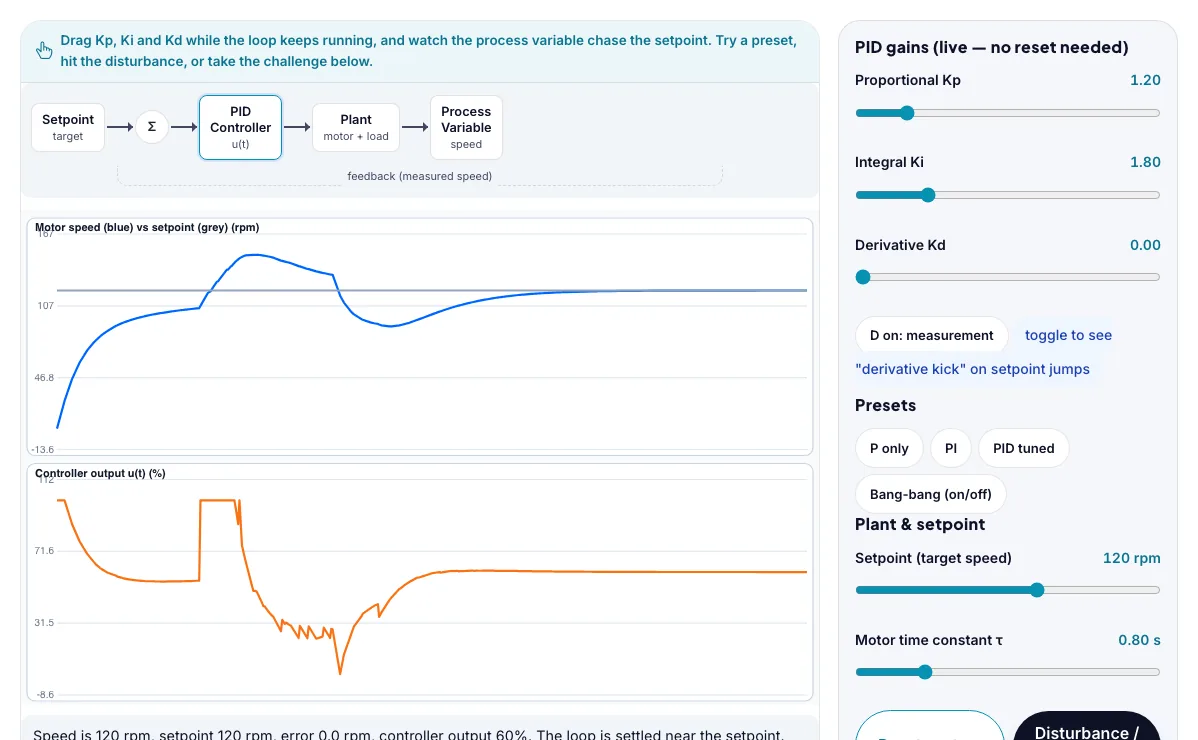
The PID Control System Simulator with sample data entered and the result showing.
What is the PID Control System Simulator?
Tune a PID controller driving a simulated DC motor toward a target speed, watch the response live, and feel what each of P, I and D actually does. It runs in your browser, so a change to a setting or a drag on an object shows up at once.
Cruise control in cars, thermostats and HVAC systems, drone flight stabilization, industrial process control (temperature, pressure, flow), 3D printer hotends, robotics joint control and power-plant governors all run on PID or PID-like control loops.
3 steps to your result
Open the tool and follow along. Nothing to install.
What you get
A closed loop compares the process variable to a setpoint, computes an error, and feeds a controller output back into the plant, over and over.
The proportional term (Kp) reacts to how big the error is right now; more Kp means a stronger, faster push but too much causes overshoot and oscillation.
The integral term (Ki) adds up error over time, so it keeps pushing until the error is completely gone — this is what removes steady-state error, especially under a constant disturbance.
Click P only, then slowly raise Kp with the slider — watch the steady-state error shrink but never fully vanish.
Click PI and watch it reach the setpoint exactly, but with some ringing overshoot on the way there.
Click PID tuned and compare its rise time and overshoot with the PI preset on the same graph.
Used for
Pick one to see how it fits.
Engineering learners
Engineering and technology students, makers, robotics clubs and teachers of design and technology.
Try it freeTeachers
For teachers: project the PID Control System Simulator on the board, let students predict the result, then run it together and test this: Click PI and watch it reach the setpoint exactly, but with some ringing overshoot on the way there. For students: change one thing at a time and write down what changes.
Try it freeHow it compares
A plain look at this tool next to the usual alternative.
| This simulation | Textbook diagram | |
|---|---|---|
| Interactive | Drag, tap and change settings | Fixed picture |
| Install | Nothing to install | Not needed |
| Cost | Free to use | Depends on the book |
Questions people ask
Why does P-only control never quite reach the setpoint?
With only a proportional term, the controller output shrinks as the error shrinks, so at some point the output is too small to overcome friction or load — the loop settles with a small permanent offset called steady-state error. Adding an integral term removes it because the integral keeps growing (and pushing) as long as any error remains.
What is integral windup and why does it matter?
If the error stays large for a while (for example right after a big setpoint change), the integral term can build up to a huge value while the actuator is already saturated at its limit. When the error finally crosses zero, that huge accumulated value keeps pushing the wrong way for too long, causing a big overshoot. Clamping the integral accumulator (or the controller output) to a realistic actuator range is the standard fix, called anti-windup.
Why does raising Kd sometimes make things worse?
The derivative term reacts to the rate of change of the error, so it is very sensitive to noisy or jumpy measurements — a real tachometer or thermometer jitters slightly, and Kd amplifies that jitter into a jerky output. In a clean simulation Kd mostly helps, but in the real world engineers usually filter the signal before differentiating it.
Is the PID Control System Simulator free to use?
Yes. The PID Control System Simulator is free, needs no signup or download and runs in your web browser. It is part of the Engineering group of AZRS simulations.
Does the PID Control System Simulator work on a phone or tablet?
Yes. The PID Control System Simulator takes touch input as well as mouse input, so you can use its 5 adjustable settings with a finger. A larger screen makes the controls and graphs easier to read.
More free tools
Related to the PID Control System Simulator.
Try the PID Control System Simulator now
Tune a PID controller driving a simulated DC motor toward a target speed, watch the. Free to use.
Try it free