
Explore the Phototropism & Gravitropism Lab
Rotate the pot and move the light, predict which way the shoot and root will grow, then run the simulation and check your prediction.
- Free to use
- No signup
- Nothing to install
- Runs in your browser
Illustration. Open the tool for the real thing.
See it in action
The Phototropism & Gravitropism Lab with sample data entered and the result showing.
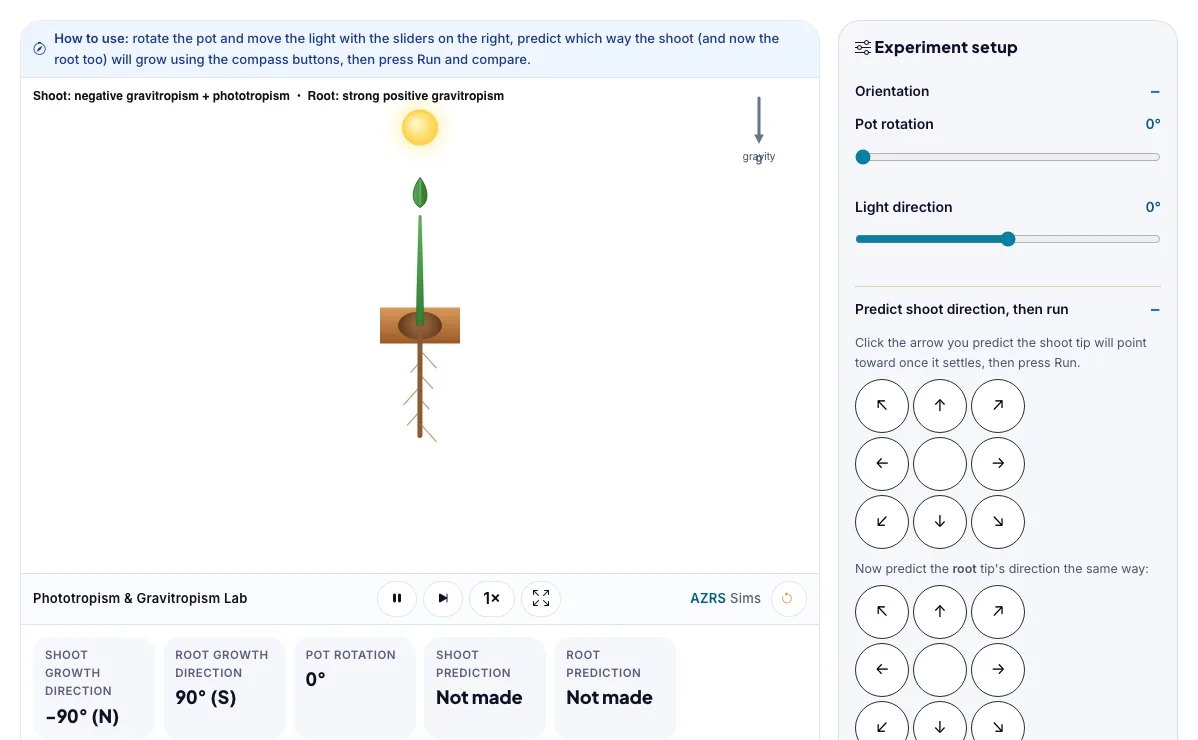
What is the Phototropism & Gravitropism Lab?
Rotate the pot and move the light, predict which way the shoot and root will grow, then run the simulation and check your prediction. It runs in your browser, so a change to a setting or a drag on an object shows up at once.
Farmers count on gravitropism when planting seeds any-side-up, and space agencies studied plant tropisms on the International Space Station to see how growth changes with weaker or absent gravity.
3 steps to your result
Open the tool and follow along. Nothing to install.
What you get
Shoots show negative gravitropism (grow away from gravity) combined with positive phototropism (grow toward light).
Roots show strong positive gravitropism and are largely insensitive to light.
Dense statoliths inside root and shoot cells settle toward the lowest side under gravity, triggering the auxin redistribution that curves the organ.
Set the light straight up and predict the shoot direction before running.
Rotate the pot 90 degrees and predict again - did your answer change?
Move the light to a hard side angle and see how far off gravity alone the shoot ends up.
Used for
Pick one to see how it fits.
Teachers
For teachers: project the Phototropism & Gravitropism Lab on the board, let students predict the result, then run it together and test this: Rotate the pot 90 degrees and predict again - did your answer change?. For students: change one thing at a time and write down what changes.
Try it freeHow it compares
A plain look at this tool next to the usual alternative.
| This simulation | Textbook diagram | |
|---|---|---|
| Interactive | Drag, tap and change settings | Fixed picture |
| Install | Nothing to install | Not needed |
| Cost | Free to use | Depends on the book |
Questions people ask
Why do shoots grow up and roots grow down?
Shoots combine negative gravitropism with phototropism to reach for light, while roots use strong positive gravitropism to anchor and find water and nutrients in the soil.
What happens if you rotate a growing seedling on its side?
Statoliths resettle to the new lowest side of the cells, and within hours the shoot curves back upward and the root curves back downward.
Is the Phototropism & Gravitropism Lab free to use?
Yes. The Phototropism & Gravitropism Lab is free, needs no signup or download and runs in your web browser. It is part of the Botany group of AZRS simulations.
Does the Phototropism & Gravitropism Lab work on a phone or tablet?
Yes. The Phototropism & Gravitropism Lab takes touch input as well as mouse input, so you can use its 2 adjustable settings with a finger. A larger screen makes the controls and graphs easier to read.
How do I use the Phototropism & Gravitropism Lab?
1. In the Phototropism & Gravitropism Lab, use the controls to change Pot rotation, Light direction. The simulation reacts instantly. 2. In the Phototropism & Gravitropism Lab, press "Run simulation" to start, reset or change what is happening. 3. Start with this experiment: Set the light straight up and predict the shoot direction before running. Drag any glowing handle, object or slider with your mouse or finger and the Phototropism & Gravitropism Lab responds in real time. 4. Change one setting at a time and watch which readout moves, then compare it with this idea: Shoots show negative gravitropism (grow away from gravity) combined with positive phototropism (grow toward light).
More free tools
Related to the Phototropism & Gravitropism Lab.
Try the Phototropism & Gravitropism Lab now
Rotate the pot and move the light, predict which way the shoot and root will grow, then. Free to use.
Try it free